
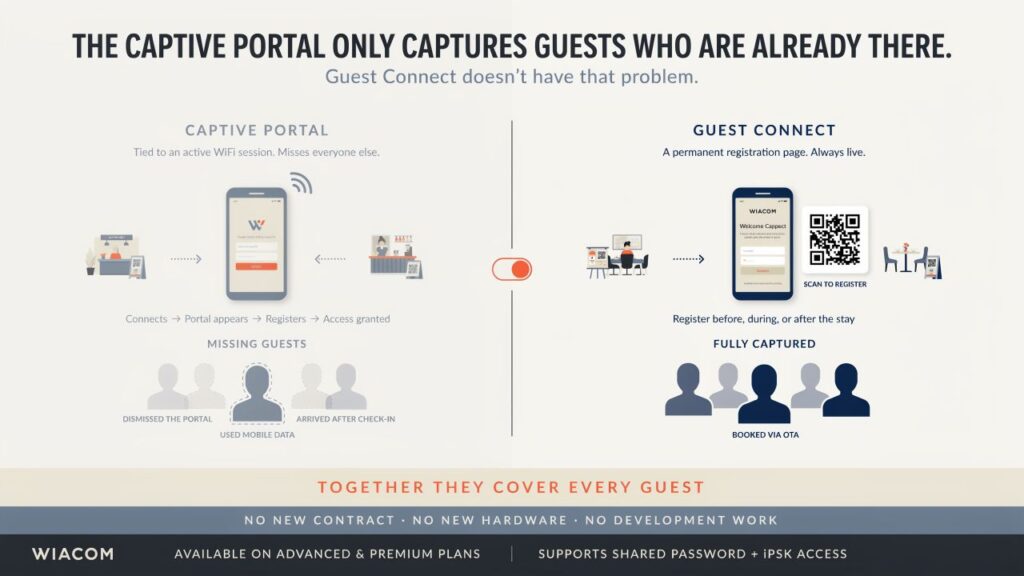
A captive portal is triggered by a WiFi connection. The guest connects, the portal appears, they register, they get access. It is an effective mechanism — but it has a hard constraint: it only captures guests who are actively connecting to your WiFi at that moment.
Guests who connected but dismissed the portal. Guests who used mobile data instead. Guests who arrived after check-in when the portal session was already authorised. Guests who booked through an OTA and whose contact details you never received. All of them leave without entering your database.
Wiacom Guest Connect is a separate onboarding channel that removes this constraint entirely.
A permanent registration page, not a login flow
Guest Connect gives every venue a permanent, branded registration URL and a printable QR poster. The page is always live — it is not tied to a WiFi session. Guests can register before they arrive, during their stay, or even after they leave.
Place the QR code on a table card, a check-in receipt, a pre-arrival confirmation email, or an in-room card. Send the link via WhatsApp or SMS. Embed it in a booking confirmation. The registration happens wherever the guest encounters it — no active WiFi session required.
When a guest registers, they receive a confirmation email with their WiFi credentials and a scannable QR code they can save. On their next visit, they reconnect in one tap.
Double opt-in, clean data
Every Guest Connect registration goes through email confirmation. No data is stored until the guest clicks the confirmation link. Marketing consent is captured as a separate, explicit step — fully GDPR and UK GDPR compliant.
The venue ends up with a verified list of guests who have actively chosen to engage — a meaningfully different data quality from raw portal login logs.
The OTA problem it solves
Hotels booked through OTAs rarely receive guest contact details from the booking platform. Guest Connect changes the dynamic: a QR code at check-in or in the room gives every guest — regardless of how they booked — a direct route into the hotel’s own contact database. The hotel builds first-party relationships with guests who would otherwise remain permanently anonymous.
PMS-linked access: WiFi that knows when the stay begins and ends
When Guest Connect is integrated with the property management system, the WiFi access it provisions is tied to the reservation — not just the registration. The guest registers via QR code or link, but the credential is only active for the duration of their stay. At check-out, access is revoked automatically, in the same way as any PMS-triggered provisioning.
This means a guest who registers via Guest Connect before they arrive — from the pre-arrival email, the booking confirmation, or a WhatsApp message — already has their credential ready, but it only activates when the PMS confirms check-in. When they check out, it expires without any manual intervention.
For hotels, this closes the loop between a frictionless registration experience and a compliant, time-bounded access lifecycle — satisfying PCI DSS v4.0 per-stay credential rotation without any additional operational process.
Shared password or personal credential — your choice
Guest Connect supports two access modes. In shared password mode, registered guests receive the venue’s WiFi passphrase in their confirmation email. In iPSK mode, each guest receives a unique personal passphrase provisioned on the WiFi controller — satisfying PCI DSS v4.0 per-device credential requirements and removing the security risk of a single shared key.
Delivery that works without a third-party account
Credential delivery — the confirmation email, the OTP for phone sign-up, the WiFi passphrase — is handled through Wiacom’s built-in messaging channels. No Twilio account to set up, no SendGrid configuration, no external SMS gateway to connect. Email, SMS, RCS, and WhatsApp are all available as default platform channels from day one.
Not a replacement for the captive portal
Guest Connect works alongside the captive portal, not instead of it. The captive portal captures guests at the point of WiFi connection. Guest Connect captures everyone else. Together, the two channels cover the full guest population — connected or not.
For venues running Wiacom, enabling Guest Connect requires no additional contract, no new hardware, and no development work. It is a feature toggle, a QR code, and a shareable link.
Wiacom Guest Connect is available on Wiacom’s Advanced and Premium plans. Supports shared password and iPSK access modes on Cisco Meraki and other major WiFi vendors.
