

Wiacom Passpoint Connect
Passpoint WiFi and Hotspot 2.0 for secure, automatic guest connectivity
Wiacom Passpoint Connect enables devices to connect automatically to supported WiFi networks after a one-time onboarding process.
Using Passpoint (Hotspot 2.0), RADIUS-based authentication and enterprise WiFi security, organisations can provide a more seamless guest WiFi experience without requiring users to complete a captive portal every time they return.
Passpoint Connect can be used for hotels, hospitality groups, retail, shopping centres, offices, managed living, venues, transport environments and other public or enterprise WiFi deployments.
Wiacom works with compatible multi-vendor WiFi infrastructure and can assist with onboarding, network configuration, RADIUS integration, deployment and ongoing technical support.
What is Passpoint WiFi?
Passpoint, also known as Hotspot 2.0, is a WiFi technology designed to simplify network discovery, authentication and secure reconnection.
Instead of requiring a user to manually select a network and repeatedly complete a captive portal, a compatible device can use a provisioned Passpoint profile to recognise supported networks and authenticate automatically.
Passpoint typically works with enterprise WiFi security and RADIUS authentication, allowing connectivity to be associated with an individual user or credential rather than a shared WiFi password.
For guest WiFi environments, this can provide an experience closer to cellular connectivity:
Register once → install the Passpoint profile → return → connect automatically.
Passpoint can complement rather than immediately replace an existing captive portal. Organisations can continue using Captive Portal or Guest Connect for initial onboarding while offering Passpoint for subsequent secure and automatic connections.
Passpoint WiFi for Hotels and Hospitality
Hotels often know who the guest is before the guest reaches the property.
Wiacom can connect Passpoint WiFi onboarding with existing hotel guest journeys, including Guest Connect, reservation or PMS-driven workflows, loyalty programmes, digital check-in and other approved identity sources.
A hotel can invite an identified guest to activate Passpoint guest WiFi before arrival. Once the Passpoint profile is installed on a supported device, the guest can arrive at the property and automatically connect to compatible WiFi infrastructure using secure WiFi authentication.
This allows Passpoint for hotels to become part of the wider guest journey rather than a separate WiFi registration process.
For example, the hotel may already know the guest through:
- a direct reservation;
- an OTA reservation imported into the PMS;
- a loyalty programme;
- the hotel mobile application;
- digital check-in;
- Guest Connect;
- an existing CRM or identity platform.
Wiacom can use these approved identity and reservation workflows to support pre-arrival WiFi onboarding, individual guest access and automatic WiFi authentication.
For returning guests, the experience can move from:
Select WiFi → open captive portal → enter details → authenticate
to:
Arrive → connect automatically
This can provide a more seamless and potentially passwordless WiFi experience while retaining individual guest identity and secure authentication.
Depending on the deployment, hotel Passpoint WiFi can use Wiacom-managed RADIUS services or integrate with the hotel’s, hotel group’s or service provider’s existing RADIUS WiFi authentication and identity infrastructure.
Access policies and validity can also be linked to the relevant guest or operational workflow. For example, WiFi access may be provisioned before arrival, remain valid throughout the reservation period and expire according to checkout or another defined policy.
For hotel groups, Wiacom can support Passpoint across multiple participating properties, helping recognised guests automatically connect when they visit compatible locations.
At the same time, Wiacom can continue to provide guest WiFi analytics, WiFi identity, consent records and first-party data from WiFi where applicable and permitted.
This makes Passpoint WiFi suitable not only for improving connectivity, but also for connecting hotel WiFi with PMS, CRM, CDP, loyalty, guest identity and operational systems.
Passpoint can form part of a wider Wiacom hotel guest WiFi strategy combining Hotel Guest WiFi, Guest Connect, PMS integration, WiFi Pass, Captive Portal and guest analytics.
Hotels can therefore choose the onboarding and authentication model appropriate for each guest journey while maintaining a common identity, access and data layer.
Passpoint and Captive Portal Can Work Together
Passpoint WiFi does not require hotels or venues to abandon the captive portal.
Instead, Passpoint and captive portal workflows can complement each other.
A Passpoint captive portal can remain useful for first-time onboarding, guest identity verification, consent, campaigns, surveys and visitors who do not yet have a Passpoint profile.
The captive portal, Guest Connect or another approved onboarding workflow can establish the user’s identity and initiate Passpoint onboarding.
Once the Passpoint profile has been provisioned, supported devices can use automatic WiFi authentication on subsequent visits without requiring the user to repeatedly open the captive portal and enter the same information again.
This creates a simple progression:
First visit → onboarding → Passpoint profile → automatic future WiFi connection
For hotels, the initial onboarding may also happen before the guest arrives:
Reservation or Guest Connect → pre-arrival WiFi onboarding → Passpoint profile → automatic connection at the hotel
This hybrid model allows organisations to combine the benefits of the traditional captive portal with the convenience and security of Passpoint WiFi.
The captive portal can continue to support:
- first-time guest registration;
- email or mobile verification;
- consent and privacy workflows;
- marketing permissions;
- guest surveys;
- campaign content;
- CRM and CDP integration;
- first-party data collection;
- visitors without a Passpoint-capable device.
Passpoint can then provide:
- automatic WiFi authentication;
- secure guest WiFi access;
- repeat-visit connectivity;
- individual WiFi identity;
- WPA2/WPA3 Enterprise WiFi authentication;
- RADIUS-based guest WiFi authentication;
- multi-property connectivity;
- reduced dependence on shared WiFi passwords;
- a more seamless experience for returning guests.
Wiacom can therefore combine Passpoint guest WiFi, captive portal, Guest Connect and RADIUS authentication within the same guest connectivity strategy rather than requiring organisations to choose only one access method.
From Captive Portal to Recognised Guest WiFi
Passpoint can also be introduced progressively.
A hotel does not need to replace its existing guest WiFi journey immediately.
New or unidentified guests can continue to use the existing captive portal, while recognised or previously onboarded guests can progressively move towards automatic Passpoint WiFi access.
A typical hotel journey can therefore become:
Unknown guest → Captive Portal or Guest Connect → identity established → Passpoint onboarding → recognised guest → automatic WiFi on future visits
This approach allows hotels to maintain familiar guest WiFi workflows while introducing a more persistent WiFi identity layer for returning guests.
For hotel groups, this can extend beyond a single property. A guest onboarded at one participating hotel can potentially use the same Passpoint identity to connect automatically at other compatible properties according to the group’s access and authentication policies.
Passpoint, Identity and MAC Address Randomisation
Modern mobile operating systems can use private or randomised MAC addresses, which can make traditional device-based recognition less reliable.
Passpoint provides an alternative model based on provisioned credentials and authenticated network access rather than relying only on a device MAC address.
For organisations using Wiacom analytics and customer identity capabilities, Passpoint can therefore help create a more persistent relationship between authorised connectivity and the user or credential, while respecting applicable privacy and consent requirements.
This is especially useful in environments with repeat visitors, such as hotels, retail estates, shopping centres, managed living, workplaces and transport locations.
Secure Passpoint WiFi Across Existing Infrastructure
Wiacom Passpoint Connect provides automatic, identity-based WiFi connectivity for guests and users across compatible public and enterprise WiFi environments.
After initial onboarding and profile provisioning, supported devices can recognise participating networks and authenticate automatically using enterprise WiFi security and individual credentials.
Wiacom is designed to work with compatible existing WiFi infrastructure rather than requiring organisations to replace their entire network. Our team can assist with Passpoint and Hotspot 2.0 configuration, RADIUS integration, SSID and security settings, onboarding, testing and ongoing technical operations.
This allows hotels, enterprises, MSPs, ISPs and multi-location organisations to introduce Passpoint WiFi while retaining control of their existing network and identity architecture.
From Guest WiFi Access to First-Party Data
Passpoint does more than remove repeated WiFi login friction.
When used as part of the wider Wiacom platform, authenticated WiFi access can contribute to a consent-aware first-party customer data strategy.
Depending on the deployment, organisations can connect WiFi identity and access information with:
- Captive Portal and Guest Connect registrations;
- PMS and booking systems;
- CRM and CDP platforms;
- loyalty programmes;
- location and presence analytics;
- customer engagement;
- APIs and other approved business systems.
This allows WiFi to become part of a broader identity and customer-data architecture rather than operating as an isolated connectivity service.
With appropriate consent and governance, relevant WiFi identity, presence and engagement data can also be made available through supported APIs and integrations to CRM, CDP, analytics, automation and AI systems as part of a wider first-party data strategy.
For the Users (Guest)
Secure Wi-Fi that connects itself
Wiacom Passpoint Connect lets users connect to public and enterprise Wi-Fi once and stay connected automatically across hotels, cafés, venues, and business locations.

Secure and Encrypted WiFi Connection

Auto connection for all of your devices

No need to type your password again

For the Business, Venue or Network Operator
Secure WiFi access, individual identity and operational control
While users gain more seamless connectivity, organisations can combine Passpoint WiFi with individual authentication, RADIUS access policies, guest identity, analytics and integrations with existing business systems.
Through the wider Wiacom platform, Passpoint can also connect with Captive Portal, Guest Connect, PMS, CRM, CDP, loyalty platforms and approved first-party data workflows.
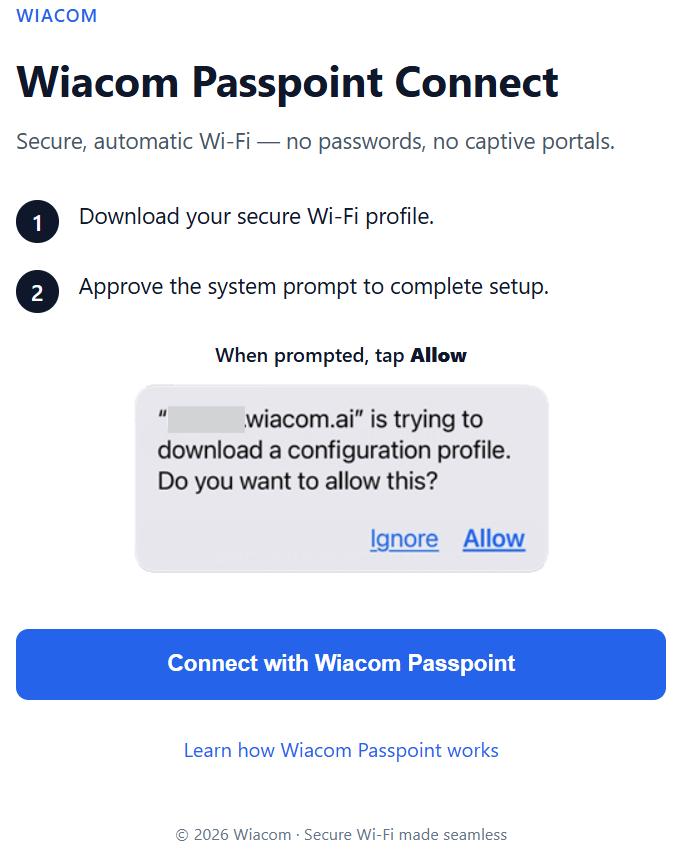
How Passpoint WiFi Works
One-time onboarding. Automatic return connectivity.
- The user completes an approved onboarding or identity workflow.
- A Passpoint profile is provisioned on the supported device.
- The device recognises compatible participating WiFi networks.
- The device authenticates automatically using the configured Passpoint and RADIUS credentials.
After provisioning, returning users can connect without repeatedly completing the full captive portal or login process.
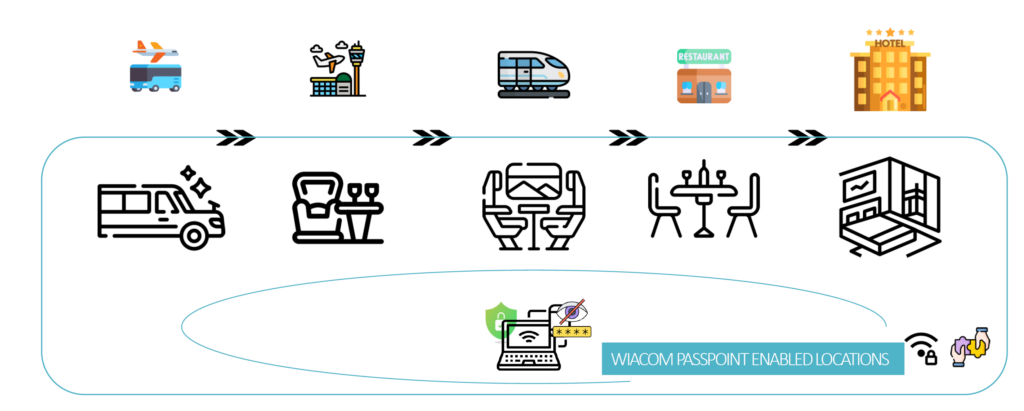
How It works – along the journey
Passpoint, Hotspot 2.0 and OpenRoaming
Passpoint is the underlying technology that enables devices to discover and securely authenticate to compatible WiFi networks automatically.
OpenRoaming extends this model through federated identity and roaming between participating networks and identity providers.
Wiacom Passpoint Connect is designed around identity-based WiFi access and can support OpenRoaming-oriented deployment models as federation capabilities are enabled for the required environment.
Passpoint WiFi Deployment, Hotspot 2.0 Integration and Technical Support
Deploying Passpoint WiFi or Hotspot 2.0 involves more than enabling a feature in a software dashboard.
A production deployment may require coordination between WiFi infrastructure, SSID and security settings, RADIUS authentication, identity systems, onboarding workflows and compatible user devices.
Wiacom works with organisations, MSPs, ISPs and WiFi integrators to design, configure, test and operate Passpoint guest WiFi environments across compatible network infrastructure.
Depending on the project, Wiacom can assist with or perform authorised configuration changes within the customer’s network environment and work alongside existing IT teams, service providers and infrastructure vendors.
Passpoint WiFi for MSPs and ISPs
MSPs and ISPs can use Wiacom to offer Passpoint WiFi as part of a managed WiFi service across multiple customer environments.
Wiacom provides centralised onboarding and operational management while allowing each customer to maintain separate Passpoint settings, RADIUS infrastructure, network configuration, identity policies and access rules.
Partners can operate the service directly or work with Wiacom for implementation, controller configuration, RADIUS integration, troubleshooting and ongoing technical operations.
Independent Passpoint Environments for Each Organisation
Wiacom can manage multiple independent Passpoint WiFi environments from the same platform.
Each customer, brand, property group or organisation can maintain its own:
- Passpoint organisation details;
- Hotspot 2.0 configuration;
- Passpoint profiles;
- onboarding policies;
- WiFi identity model;
- SSIDs and network configuration;
- authentication architecture;
- RADIUS infrastructure;
- access and validity policies.
This allows MSPs, ISPs and multi-organisation environments to manage customers centrally while keeping each customer’s Passpoint and WiFi authentication environment logically separated.
Customers are not required to share a single common AAA or identity architecture simply because their Passpoint deployments are managed through the same platform.
Wiacom-Managed or Customer-Managed RADIUS
Wiacom supports different RADIUS WiFi authentication models depending on the customer’s infrastructure and operational requirements.
An organisation can use:
- Wiacom-managed RADIUS authentication;
- its own existing RADIUS server;
- an MSP or service-provider RADIUS platform;
- integration with existing AAA infrastructure;
- integration with enterprise identity systems;
- hybrid authentication architectures.
This gives customers the option to use Wiacom as the managed authentication layer or retain their existing identity and RADIUS infrastructure.
It also allows Passpoint to be introduced into established enterprise or service-provider environments without requiring the entire authentication architecture to be replaced.
WiFi Controller and Network Integration
A Passpoint deployment also requires the underlying WiFi infrastructure to be configured correctly.
Wiacom can assist with compatible controller, access point and SSID configuration, including:
- Passpoint and Hotspot 2.0 settings;
- WPA2/WPA3 Enterprise WiFi;
- 802.1X and RADIUS authentication;
- SSID and security configuration;
- RADIUS server and shared-secret configuration;
- VLAN and access-policy integration;
- Passpoint profile parameters;
- multi-site deployment;
- multi-vendor WiFi environments.
This is particularly relevant for MSPs, hotel groups and enterprises where different sites may use different WiFi vendors or controller architectures.
Passpoint Onboarding and Profile Provisioning
Wiacom can integrate Passpoint onboarding with different user and identity workflows.
Depending on the deployment, onboarding may originate from:
- Captive Portal;
- Guest Connect;
- email or mobile verification;
- customer or member identity;
- loyalty systems;
- PMS or reservation platforms;
- enterprise identity providers;
- CRM or CDP systems;
- custom applications or APIs.
Once the required identity and access conditions have been established, Wiacom can provision the Passpoint profile required for supported devices to use automatic WiFi authentication.
This allows Passpoint to operate as part of a wider WiFi identity and access workflow rather than as an isolated network feature.
Multi-Vendor Passpoint WiFi Deployment
Wiacom is designed for multi-vendor WiFi environments.
Organisations do not necessarily need to standardise every site on the same WiFi controller or access-point vendor in order to introduce a common Passpoint and WiFi identity strategy.
Where supported by the underlying infrastructure, Wiacom can provide a common onboarding, authentication and operational layer across different network environments.
This can be particularly useful for:
- MSP-managed customer estates;
- hotel groups with different WiFi vendors across properties;
- multi-site enterprises;
- organisations acquiring or consolidating existing locations;
- service providers operating customer-specific network environments.
Testing, Troubleshooting and Operational Support
Passpoint deployments can involve interaction between user devices, WiFi infrastructure, RADIUS, certificates, identity systems and onboarding workflows.
Wiacom provides technical support beyond initial configuration.
Support can include:
- Passpoint and Hotspot 2.0 configuration;
- profile provisioning and onboarding;
- RADIUS WiFi authentication;
- WPA2/WPA3 Enterprise WiFi;
- controller and access-point configuration;
- authentication troubleshooting;
- device onboarding diagnostics;
- multi-vendor integration;
- network and access-policy testing;
- Captive Portal and Guest Connect integration;
- PMS, CRM, CDP, IdP and API integration;
- custom workflows and development;
- migration from existing guest WiFi platforms;
- ongoing technical and operational support.
Where authorised, Wiacom can also work directly within the customer’s network environment to investigate issues, validate configuration and assist with implementation changes.
Passpoint as an Operational Service
Wiacom can therefore provide more than access to Passpoint software.
It can provide the Passpoint onboarding, WiFi identity, authentication and integration layer between users, existing WiFi infrastructure, RADIUS or identity platforms and customer business systems.
This allows organisations and service providers to deploy Passpoint WiFi and Hotspot 2.0 as an operational service, while retaining control over their own network, identity and authentication architecture.
Cisco ecosystem integration
Wiacom is listed on the Cisco Networking App Marketplace through Wiacom Guest Connect. Wiacom solutions integrate with compatible Cisco Meraki infrastructure to provide guest onboarding, identity-based access and managed connectivity.

Business benefits
• Individual, identity-based WiFi access
• Automatic connectivity for returning users
• RADIUS and WPA2/WPA3 Enterprise authentication
• PMS, CRM, CDP and loyalty integration
• Guest WiFi analytics and consent-aware first-party data

Built for modern public spaces
• Hotels & resorts, Cafés & restaurants
• Offices & coworking
• Retail & malls
• Events & venues
• Transport & public Wi-Fi
Passpoint WiFi FAQ
What is Passpoint WiFi?
Passpoint WiFi, also known as Hotspot 2.0, allows compatible devices to discover and securely authenticate to supported WiFi networks automatically after initial provisioning.
Instead of repeatedly selecting an SSID, opening a captive portal and entering the same information, a provisioned device can recognise compatible networks and use secure credentials for automatic WiFi authentication.
Is Passpoint the same as Hotspot 2.0?
Passpoint is the Wi-Fi Alliance programme and certification framework built around Hotspot 2.0 technologies.
Both terms are commonly used when referring to automatic WiFi network discovery, secure authentication and roaming between compatible WiFi networks.
Does Passpoint replace a captive portal?
Not necessarily.
A captive portal, Guest Connect or another onboarding workflow can still be used for first-time registration, identity verification, consent and Passpoint onboarding.
After a Passpoint profile has been provisioned, supported devices can reconnect automatically without repeating the complete captive portal journey.
This allows organisations to combine Passpoint WiFi and captive portal workflows rather than choosing only one approach.
Can Passpoint be used for hotel guest WiFi?
Yes.
Passpoint for hotels can provide secure and automatic WiFi connectivity for identified guests.
Wiacom can integrate hotel Passpoint WiFi with Guest Connect, reservation or PMS-driven workflows, loyalty programmes, digital check-in and other approved identity sources.
Once provisioned, supported devices can automatically authenticate to compatible hotel WiFi infrastructure on arrival or during future visits.
Can Passpoint work before a hotel guest arrives?
Yes.
Depending on the onboarding workflow, a guest can receive or activate a Passpoint profile before reaching the property.
For example, pre-arrival WiFi onboarding can be linked to a reservation, Guest Connect workflow, hotel application or other approved identity process.
Once the profile is installed, a supported device can automatically connect when it encounters the hotel’s compatible Passpoint WiFi network.
Does Passpoint use RADIUS?
Passpoint deployments commonly use enterprise authentication and RADIUS WiFi authentication to validate provisioned credentials and apply network access policies.
Wiacom can provide managed RADIUS services or integrate with an organisation’s existing RADIUS, AAA or identity infrastructure.
Can customers use their own RADIUS server with Wiacom Passpoint?
Yes, depending on the deployment architecture.
An organisation can use Wiacom-managed RADIUS or integrate its own existing RADIUS and AAA infrastructure.
This is useful for enterprises, MSPs, ISPs and other organisations that want to retain control of their authentication environment while using Wiacom for Passpoint onboarding, profile provisioning, integration and operational management.
Can different Wiacom customers have separate Passpoint environments?
Yes.
Wiacom can manage independent Passpoint environments for different customers, brands, property groups or organisations from the same platform.
Each organisation can maintain its own Passpoint settings, organisation details, profiles, onboarding policies, WiFi identity, RADIUS architecture and network configuration.
This allows MSPs and service providers to manage multiple Passpoint customers centrally while maintaining logical and operational separation between them.
Does Passpoint support WPA2 or WPA3 Enterprise WiFi?
Passpoint is commonly deployed with WPA2-Enterprise or WPA3-Enterprise WiFi and enterprise authentication mechanisms.
The exact configuration depends on the WiFi infrastructure, device capabilities, authentication method and deployment requirements.
Wiacom can assist with compatible SSID, controller, RADIUS and security configuration.
Can Passpoint help with MAC address randomisation?
Yes, in the sense that Passpoint can reduce dependence on MAC-address-only recognition.
Modern devices increasingly use private or randomised MAC addresses, which makes MAC-only guest identification less reliable.
With Passpoint, authentication can instead rely on provisioned credentials and a WiFi identity associated with the Passpoint profile.
Does Wiacom support multi-vendor Passpoint deployments?
Yes, where the underlying WiFi infrastructure provides the required Passpoint and enterprise authentication capabilities.
Wiacom is designed for multi-vendor WiFi environments and can assist with controller configuration, Hotspot 2.0 settings, RADIUS integration, Passpoint onboarding, testing and troubleshooting.
This is particularly relevant for hotel groups, MSPs and multi-site organisations that operate different WiFi vendors across their locations.
Can Passpoint provide passwordless WiFi?
Passpoint can significantly reduce reliance on shared WiFi passwords.
After initial provisioning, supported devices can use their provisioned credentials to authenticate automatically rather than requiring the user to enter a shared password during every visit.
The exact authentication model depends on the Passpoint deployment and network architecture.
Can Passpoint be integrated with PMS, CRM or loyalty systems?
Yes.
Wiacom can connect Passpoint onboarding and WiFi identity with systems such as PMS platforms, reservation systems, CRM, CDP, loyalty programmes, identity providers and custom applications through supported integrations and APIs.
This can allow WiFi access to become part of the wider customer or guest journey instead of operating as a separate registration process.
Can Passpoint still support guest WiFi analytics and first-party data?
Yes, depending on the onboarding and identity workflow.
Passpoint can be combined with Wiacom’s guest identity, consent, analytics and integration capabilities.
This allows organisations to provide more seamless WiFi access while continuing to use consented first-party data from WiFi, guest profiles, analytics and CRM or CDP workflows where applicable.
Does Wiacom help configure and deploy Passpoint WiFi?
Yes.
Wiacom provides implementation and technical support for compatible Passpoint and Hotspot 2.0 deployments, including WiFi controller and SSID configuration, WPA2/WPA3 Enterprise settings, RADIUS integration, profile provisioning, onboarding workflows, testing and troubleshooting.
Wiacom can work alongside customer IT teams, MSPs, ISPs and network integrators or, where authorised, assist directly with configuration and operational changes within supported customer environments.
WiFi Identity, Access, Engagement and Analytics for Marketing, IT & Operations Teams

US, UK, EU: +40 721 260 892
info@wiacom.ai
© 2026 Wiacom
All rights reserved


