
For years, venue WiFi platforms used MAC addresses as the anchor for guest identity. When a guest connected, their device MAC was logged. On the next visit, the same MAC appeared — the system recognised the device as a returning guest, updated visit counts, and fed analytics dashboards with return rate data.
That model stopped working in 2020.
What changed
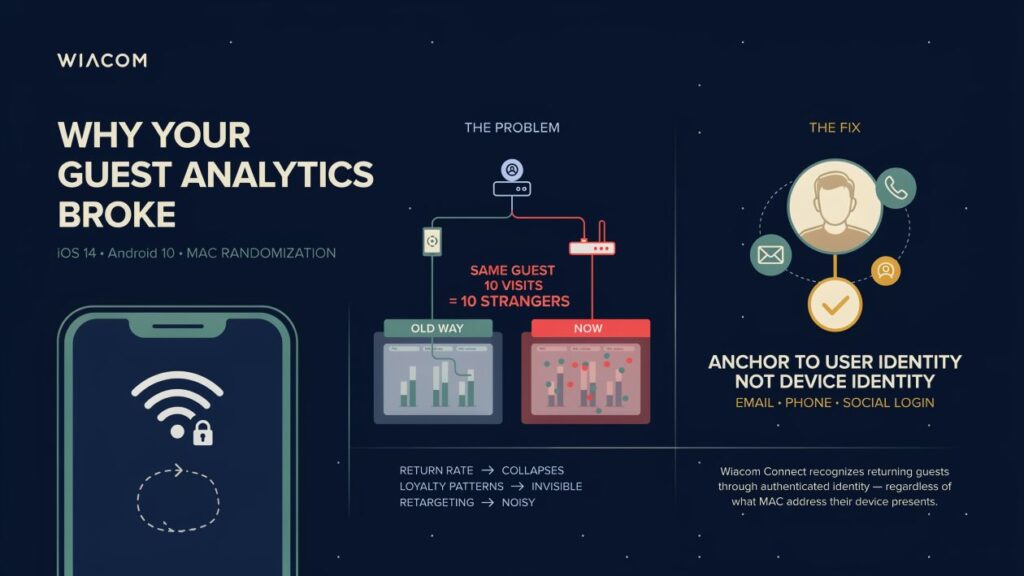
Apple introduced MAC address randomisation in iOS 14. Android followed with Android 10. Both operating systems now use a private, randomised MAC address by default, a different one for each WiFi network, which can also change over time. The same device no longer presents one stable identifier.
The practical result: a guest who visited your venue 10 times in the past year can look like several different first-time visitors in your analytics. Return rate figures collapse. Loyalty patterns become invisible. Any segmentation that relies on device continuity — “guests who visited more than three times” — becomes unreliable.
This is not a niche technical issue. Every iPhone running iOS 14 or later and every Android device running Android 10 or later behaves this way by default. That is the majority of smartphones connecting to your guest WiFi today.
Why it matters beyond analytics
The impact goes further than reporting accuracy.
Marketing retargeting loses precision when returning guests can’t be distinguished from new ones. Campaigns that should target loyal visitors end up reaching everyone.
Loyalty and CRM can’t automatically recognise a known guest on arrival if device identity is randomised. The guest has to identify themselves manually — friction that most don’t bother with.
Network access policies that relied on MAC-based session continuity — allowing a known device to reconnect without re-authentication — break silently. Guests get prompted to log in again on every visit.
The fix: anchor to user identity, not device identity
A durable fix is to anchor guest recognition to something that does not change when the MAC address does: a credential issued to the guest, or a verified user identity. Wiacom supports both. Where your WiFi infrastructure allows it, a credential is the better choice.
Where possible: use a unique PSK or Passpoint
These two options replace MAC-based recognition with a credential that belongs to the guest:
- Unique PSK (WiFi Pass): each guest receives their own WiFi key, delivered as iPSK, MPSK or PPSK depending on the WiFi vendor. The network recognises the guest by that key, not by the device’s MAC address, so MAC randomisation does not affect recognition.
- Passpoint: after one-time onboarding, a WiFi profile on the guest’s device connects automatically, authenticated through RADIUS. Recognition is tied to the profile’s credentials, not the MAC address, and returning guests connect without opening a login page.
Wiacom delivers both through a captive portal registration or through Guest Connect. The guest registers once, then receives a unique PSK or a Passpoint profile for future visits. Both depend on what the venue’s WiFi infrastructure and RADIUS setup support, and Wiacom can help check and configure that.
Captive portal environments: Wiacom Connect
Where guests keep connecting through the captive portal, Wiacom Connect is the companion that keeps returning guests recognised. When a guest registers through the Wiacom captive portal, their identity is tied to a verified contact: email, phone number or social login. On later visits, Wiacom Connect recognises the returning user through a unique identifier, not through the MAC address. Return-visit detection, welcome-back portal flows and loyalty segmentation keep working across locations.
Wiacom Connect does not add any MAC address or MAC-related data of its own, so together with the captive portal, recognition does not rely on the MAC address at all.
Wiacom Connect is a companion to the captive portal only. It is not a companion of Guest Connect, which has nothing to do with MAC addresses, and it is not needed with a unique PSK or Passpoint, which identify the guest by credential.
Captive portals that rely on MAC addresses vs Wiacom
Legacy captive portal providers that rely on MAC addresses recognise a returning guest by the MAC address of their device. Once that address is randomised, the same guest looks like a new visitor. Wiacom takes a different approach: Wiacom Connect works alongside the captive portal and does not rely on the MAC address.
| Captive portal that relies on MAC addresses | Wiacom captive portal with Wiacom Connect | |
|---|---|---|
| Returning-user recognition | The device’s MAC address | A unique identifier for the user, not the MAC address |
| With MAC randomisation | The same guest looks like a new visitor | Recognition is not affected |
| Analytics | Return rates collapse and first-time visitors are overcounted | Return rates and visit counts stay accurate |
| Welcome-back flows | Guests are asked to register or log in again | Returning guests are recognised and welcomed back |
| Alternatives to the portal | Depends on the provider | Unique PSK or Passpoint, delivered through captive portal registration or Guest Connect |
Your options at a glance
| Option | How a returning guest is recognised | Delivered through | Depends on the MAC address? |
|---|---|---|---|
| Unique PSK (WiFi Pass) | The guest’s own WiFi key | Captive portal registration or Guest Connect | No |
| Passpoint | Provisioned profile credentials, authenticated through RADIUS | Captive portal registration or Guest Connect | No |
| Captive portal with Wiacom Connect | A unique identifier for the returning user, not the MAC address | The captive portal itself | No |
In every case, analytics are tied to the guest’s identity or credential rather than to the device’s MAC address, so return rates and visit counts stay accurate. Only a platform that counts MAC addresses with no identity layer or credential behind them will keep overcounting first-time visitors.
Which one to use? Use a unique PSK or Passpoint for repeat visitors where the infrastructure supports it, such as hotel guests, residents and regular visitors. Keep the captive portal with Wiacom Connect for open guest networks and walk-in visitors, where a portal is still needed.
Where recognition matters most
Hotels. Returning guests are the core of direct-booking and loyalty strategy. When recognition fails, welcome-back flows and repeat-stay analytics fail with it. See the Wiacom captive portal for hotels, Passpoint for hotels and how PMS integration automates WiFi at check-in and check-out.
Retail and shopping malls. Return-visit frequency drives campaign targeting and visitor analytics, and both are distorted when returning shoppers look like new ones. See WiFi for shopping malls and large retail.
Managed living. Residents expect to stay connected on every device without logging in again. See resident WiFi identity for managed living.
Multi-site operators. If you run WiFi across several locations, WiFi analytics and managed WiFi services from Wiacom keep recognition and reporting consistent across all of them.
What venues should do now
If your WiFi analytics platform still relies primarily on MAC addresses for return visitor detection, the data you’re seeing is likely significantly undercounting return visits. The platform isn’t broken — the underlying device identifier it depended on has become unreliable.
The practical steps:
- Audit your analytics methodology — ask your WiFi platform vendor how return visitors are detected. If the answer is MAC address, the numbers are wrong.
- Move to identity-based recognition — platforms that tie each guest to a verified identity or an individual credential, not a device identifier, produce accurate return rate data regardless of MAC randomisation. Where your WiFi infrastructure supports it, use a unique PSK or Passpoint. For open guest networks and walk-in visitors, use a captive portal with recognition.
- Ensure your onboarding flow captures identity — a click-through portal with no registration captures nothing useful. Email, phone, or social login creates the persistent identity needed for accurate analytics, and it is the registration step that can issue a unique PSK or a Passpoint profile.
- Check what your infrastructure supports — a unique PSK and Passpoint depend on your WiFi vendor, controller and RADIUS setup. Wiacom works with compatible WiFi infrastructure and can help with configuration and testing.
Guest WiFi analytics are only as good as the identity layer underneath them. MAC randomisation didn’t kill guest WiFi intelligence — it just ended the era when you could get away without a proper identity layer.
Wiacom recognises returning guests without relying on MAC addresses alone: through a unique PSK or Passpoint profile, delivered after captive portal registration or through Guest Connect, and, in captive portal environments, with Wiacom Connect as the captive portal’s companion.
Learn more about Wiacom Connect → · Guest Connect → · Passpoint Connect → · Request a demo →
Talk to Wiacom about returning-guest recognition
Tell us about your venues and WiFi infrastructure, and we will show which option fits: a unique PSK, Passpoint or Wiacom Connect.


