
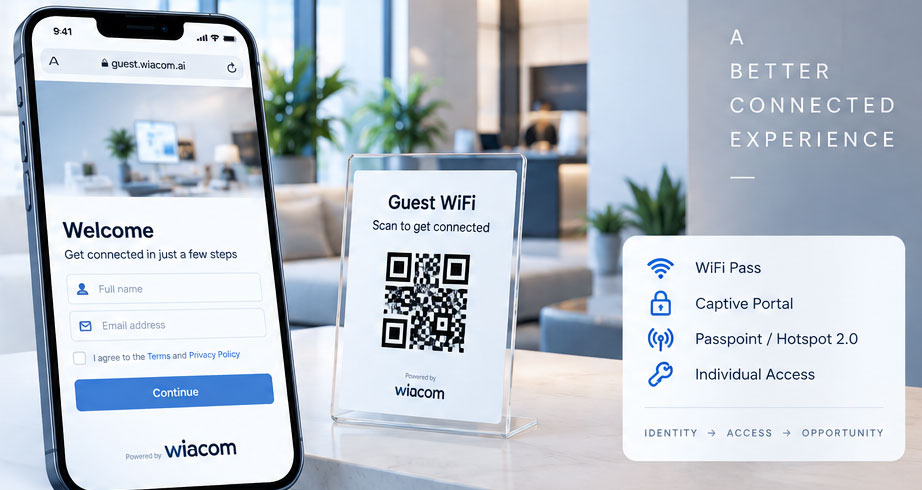
Guest WiFi Onboarding — Before Arrival or On-Site
Wiacom Guest Connect
Wiacom Guest Connect is a fully branded Guest WiFi onboarding solution that allows guests to register through a web link or QR code — before arrival or while already at the venue.
Unlike onboarding that starts only after a user connects to WiFi, Guest Connect can be accessed independently from the WiFi network and integrated into pre-arrival messages, booking journeys, digital check-in, applications, reception workflows and other customer touchpoints.
After registration, Wiacom can provide the appropriate Guest WiFi access method — including Captive Portal authorisation, an individual WiFi Pass, a shared WiFi Key Access or Passpoint / Hotspot 2.0 provisioning.
Guest Connect can operate alongside an existing captive portal or as an additional Guest WiFi onboarding channel, depending on the customer journey and WiFi infrastructure.
One branded onboarding experience. Multiple ways to connect.
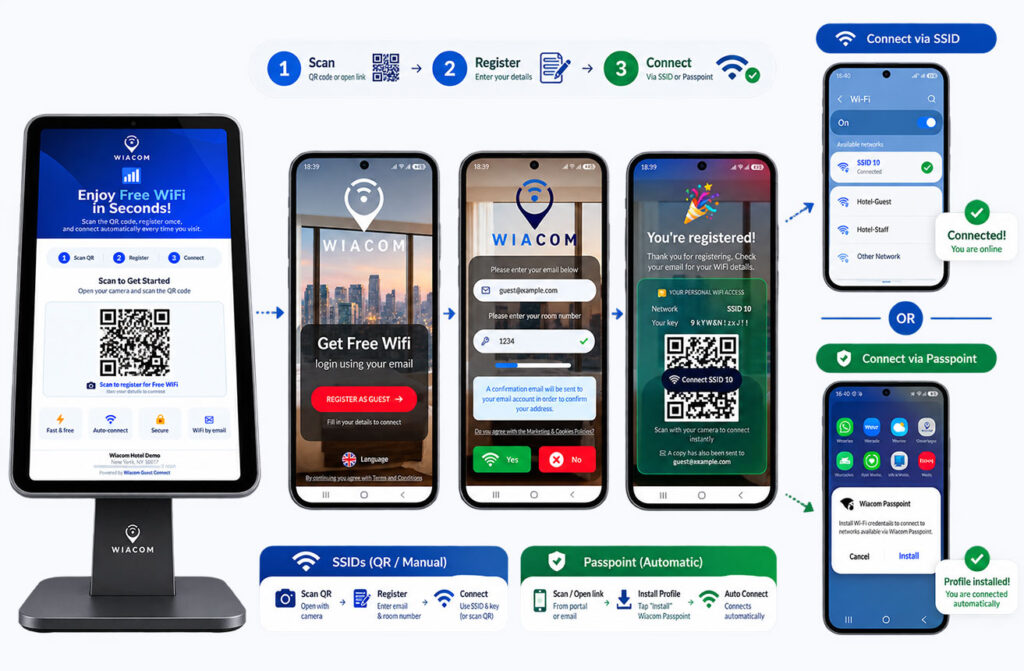
Fully Branded Guest WiFi Registration
Guest Connect can be designed around the organisation, property or customer brand rather than presenting users with a generic registration page.
Each Guest Connect experience can be configured with:
- organisation or property logo;
- brand colours;
- custom imagery;
- custom headline and messaging;
- configurable registration fields;
- terms and privacy notices;
- marketing consent options;
- confirmation messaging;
- custom calls to action;
- different branding by location or customer.
This allows hotels, retailers, venues, property operators and service providers to provide a Guest WiFi registration journey consistent with the rest of their digital customer experience.
MSPs, ISPs and WiFi integrators can also use branded or white-label configurations for different customer environments.
Guest Connect and Captive Portal Can Work Together
Guest Connect does not need to replace a captive portal.
The two onboarding methods solve different parts of the Guest WiFi journey and can operate together within the same Wiacom environment.
Captive Portal
The user normally connects to the Guest WiFi network first.
The network redirects the user to a branded captive portal where registration, verification, consent and access can take place.
Guest Connect
The user accesses a permanent web URL or QR code independently of the WiFi connection.
Registration can therefore happen before arrival, during the visit or through another customer interaction.
Use Both
A customer can use Guest Connect for pre-arrival or QR-based registration while continuing to use the Captive Portal for guests who begin their journey directly from the WiFi network.
For example:
Pre-arrival email → Guest Connect → guest identified → WiFi access prepared
while another guest can use:
Guest selects WiFi → Captive Portal → registration → access
Both journeys can contribute to the same Wiacom guest identity, consent and analytics environment.
This makes Guest Connect an additional Guest WiFi onboarding channel rather than a replacement for the captive portal.
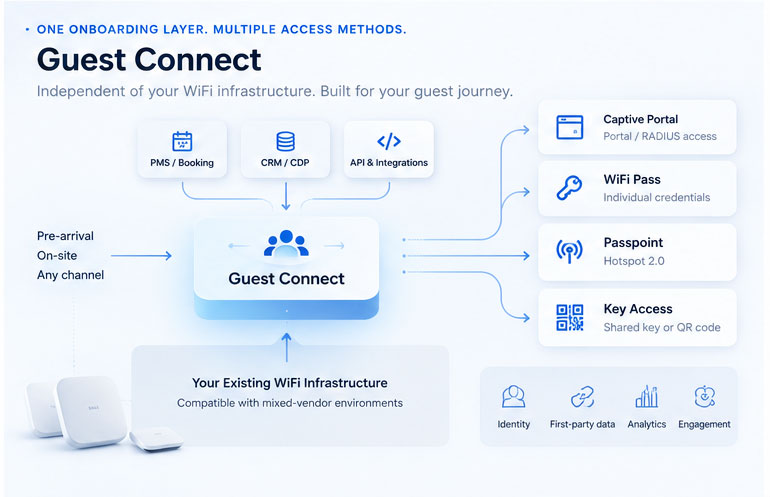
Guest WiFi Onboarding Beyond the Captive Portal
Traditional Guest WiFi registration usually begins only after someone arrives, selects an SSID and reaches the captive portal.
Guest Connect removes that dependency.
Guests can access a branded registration journey through:
This allows Guest WiFi onboarding to become part of the wider customer journey instead of an isolated network login event
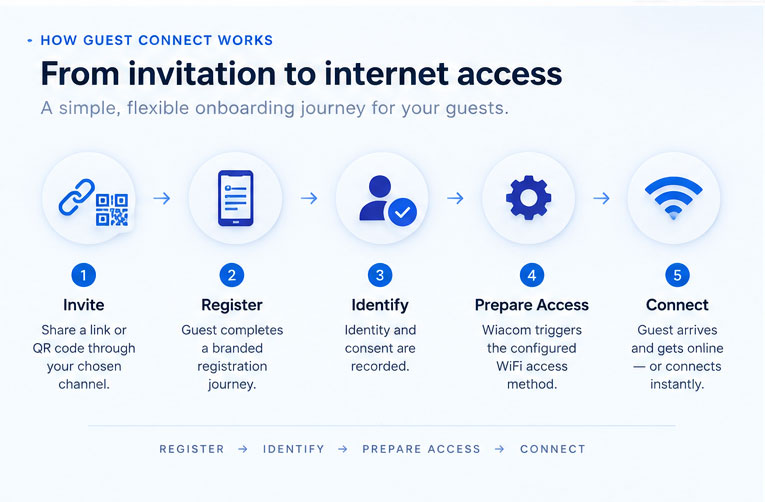
How Guest Connect Works
- Register – The guest completes a fully branded registration journey. Depending on the deployment, Wiacom can support email registration, email verification, phone and OTP, supported social login, OAuth / SSO, pre-registration and custom business integrations.
- Invite – Provide a Guest Connect URL or QR code through a booking journey, email, SMS, application, reception, signage or another customer touchpoint.
- Identify – Wiacom creates or updates the guest identity and records the applicable terms, privacy information and consent preferences. Returning users can be recognised rather than creating unnecessary duplicate registrations.
- Prepare WiFi Access – Wiacom applies the Guest WiFi access workflow configured for the location.
- Connect – The guest receives or activates the appropriate access method and connects when required.
Invite → Register → Identify → Prepare Access → Connect
One Guest WiFi Onboarding Channel. Multiple Access Methods.
Guest Connect is independent of the WiFi access method used after registration.
The same branded Guest WiFi onboarding journey can lead to different forms of network access depending on the venue, WiFi infrastructure and desired user experience.
WiFi Key Access — Works With Virtually Any WiFi Network
For networks using a standard shared WiFi password, Guest Connect does not require direct integration with the WiFi controller or access points.
After successful registration, Wiacom can provide the guest with:
- the WiFi network name (SSID);
- the WiFi password;
- a WiFi QR code;
- connection instructions;
- the WiFi credentials by email where configured.
Because Guest Connect is securely delivering the existing WiFi credentials rather than controlling the network, WiFi Key Access can work with virtually any WiFi infrastructure — including standard routers, ISP-provided CPE and WiFi systems without a direct Wiacom integration.
This provides a simple way to add branded Guest WiFi registration, guest identity, consent and first-party data collection to an existing WiFi network without replacing or integrating the underlying infrastructure.
Captive Portal
Use Guest Connect for advance registration and then authorise the recognised guest when they connect to a compatible captive-portal-enabled network.
Guest Connect and Captive Portal can coexist, providing different onboarding journeys for different users.
WiFi Pass
Provide every registered user with an individual WiFi credential and QR code instead of distributing a common password.
Depending on the supported WiFi infrastructure, personal access can use technologies such as iPSK, MPSK, PPSK or DPSK.
Passpoint WiFi
Use Guest Connect as the onboarding channel for Passpoint / Hotspot 2.0 provisioning.
Compatible devices can then securely recognise and automatically connect to participating networks.
WiFi Key Access can work independently of the WiFi vendor. Captive Portal authorisation, individual WiFi credentials and Passpoint depend on compatible infrastructure and the selected integration method.
Pre-Arrival Guest WiFi for Hotels
A hotel often knows the guest before the guest reaches the property.
The customer may already have:
- a reservation;
- a PMS record;
- a direct booking;
- a loyalty account;
- a digital check-in;
- a hotel application account;
- an existing CRM profile.
Guest Connect allows Guest WiFi onboarding to begin from those existing customer interactions.
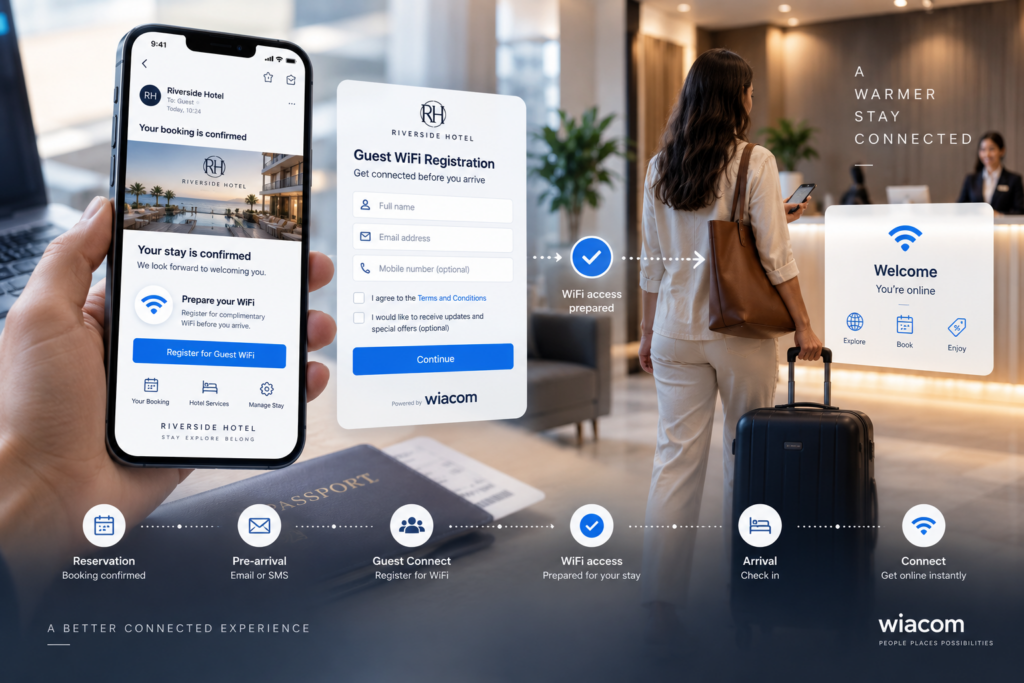
A hotel journey can become:
Reservation → Pre-arrival communication → Guest Connect → WiFi access prepared → Arrival → Connect
This makes Guest Connect particularly relevant for hotels looking for a hotel WiFi solution that connects WiFi access with the wider guest journey rather than treating the network as an isolated service.
When combined with PMS, booking, loyalty or identity integrations, Wiacom can help reduce repeated registration and prepare the appropriate access before arrival.
For hotels using a standard shared WiFi password, Guest Connect can also provide pre-arrival Guest WiFi registration and credential delivery without requiring integration with the hotel WiFi controller. The guest can receive the WiFi details and QR code through Guest Connect and/or email before arrival.
More Than a WiFi QR Code
A basic WiFi QR code normally contains an SSID and password.
Guest Connect uses a QR code or web link as the entry point into a controlled Guest WiFi onboarding workflow.
Depending on the deployment, Wiacom can use Guest Connect for:
- branded registration;
- identity verification;
- required terms;
- privacy notices;
- optional marketing consent;
- returning-guest recognition;
- personal WiFi credentials;
- Captive Portal pre-registration;
- Passpoint provisioning;
- access lifecycle management;
- first-party guest data;
- CRM and CDP integration;
- PMS integration;
- Guest WiFi analytics;
- email and SMS communications;
- APIs and custom workflows.
The result is a Guest WiFi experience connected to customer identity rather than simply distributing a network password.
With WiFi Key Access, this onboarding layer can be added even when the existing WiFi network has no direct integration with Wiacom. Guest Connect manages the registration, identity and credential-delivery experience while the existing WiFi infrastructure continues to provide connectivity.
Turn Guest WiFi Registration Into First-Party Data
Guest Connect allows organisations to connect Guest WiFi onboarding with a persistent customer identity.
Depending on the registration method and deployment, Wiacom can associate information such as:
- guest identity;
- verified email or phone;
- custom profile fields;
- registration source;
- terms acceptance;
- marketing consent;
- first and returning visits;
- WiFi access lifecycle;
- engagement;
- location and visit activity where available.
Eligible information can be connected with CRM, CDP, PMS, loyalty, BI and other supported business systems.
This creates a path from:
Guest WiFi → Identity → First-party data → Customer analytics → Business systems → Automation and AI
The WiFi interaction therefore becomes part of the organisation’s wider first-party customer-data strategy rather than remaining isolated inside the network infrastructure.
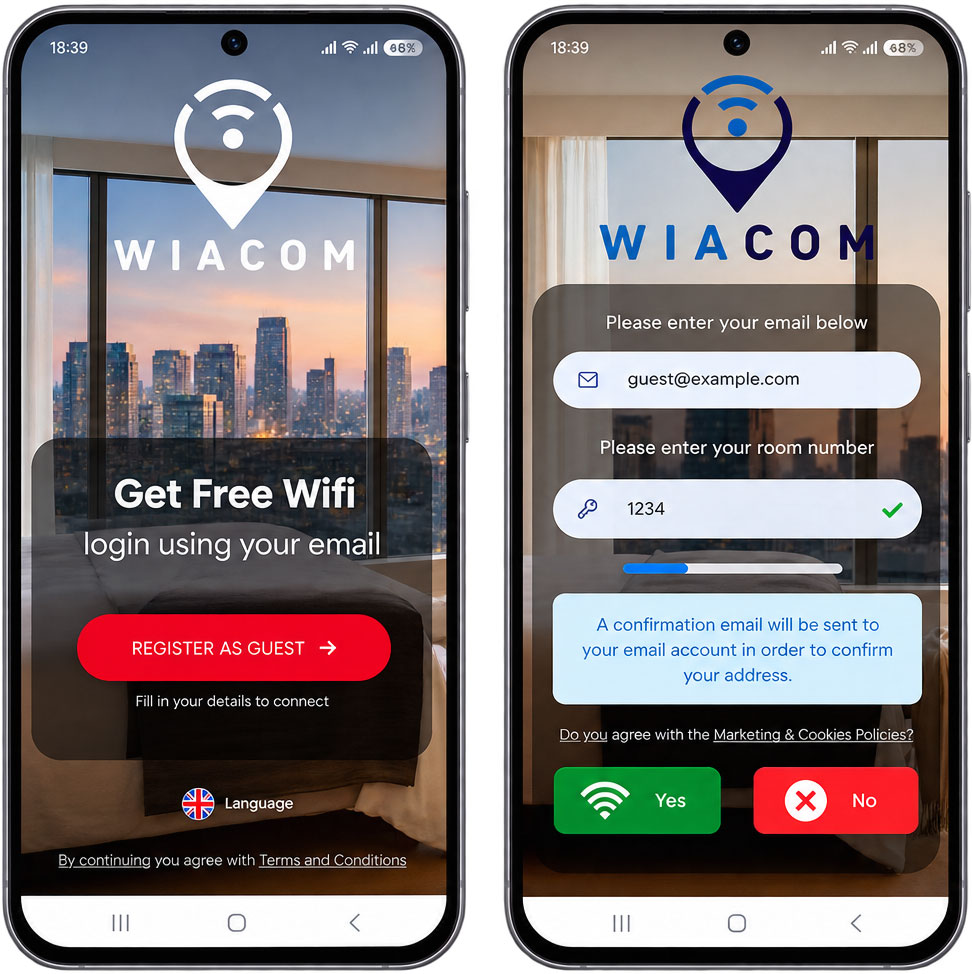
Recognise Returning Guests
Guest Connect can recognise previously registered users and update the existing guest profile rather than unnecessarily creating another record.
This provides a more consistent experience for returning customers and helps organisations build Guest WiFi journeys around people rather than treating every connection as an unrelated device session.
Depending on the configured access method, returning guests can receive the relevant credential or network-access workflow without repeating unnecessary registration steps.
This is especially valuable when Guest Connect is combined with WiFi Pass, Passpoint, PMS, loyalty or other identity-based services
Guest WiFi Analytics and Customer Insights
Guest Connect registrations can contribute to the wider Wiacom analytics and customer-data environment.
Depending on the deployment and available infrastructure data, organisations can analyse:
- total registrations;
- new versus returning guests;
- registration sources;
- peak registration periods;
- guest profiles;
- consent status;
- visit frequency;
- location activity;
- WiFi access history;
- engagement.
This allows Guest Connect to contribute to customer analytics, location analytics and first-party data even when the registration occurs before the guest connects to WiFi.
Vendor-Agnostic Guest WiFi — From Any WiFi Key Access to Advanced Integrations
Guest Connect can be deployed across a very broad range of WiFi environments.
For WiFi Key Access, no direct integration with the WiFi infrastructure is required.
If a network uses a standard SSID and shared password, Wiacom can provide those credentials to registered guests through the branded Guest Connect page, QR code and/or email.
This means Guest Connect can add Guest WiFi registration, identity, consent and first-party data collection to virtually any WiFi network, including:
- ISP-provided routers and CPE;
- standalone WiFi routers;
- small-business WiFi;
- hotel WiFi;
- managed WiFi;
- enterprise WiFi;
- WiFi infrastructure without a direct Wiacom integration.
For more advanced Guest WiFi access workflows — including Captive Portal authorisation, WiFi Pass with individual credentials, RADIUS-based access and Passpoint — Wiacom integrates with compatible network infrastructure.
Supported environments can include:
- Cisco Meraki;
- Cisco WLC;
- HPE Aruba;
- Ruckus;
- UniFi;
- Cambium;
- Fortinet;
- MikroTik;
- TP-Link Omada;
- Huawei;
- other compatible WiFi infrastructure.
Different vendors can coexist across the same organisation, allowing Wiacom to provide a common Guest WiFi identity and onboarding layer across multi-location and mixed-vendor environments.
Organisations can therefore start with simple branded Guest WiFi registration and WiFi Key Access delivery without replacing their network, then introduce more advanced identity-based access where the infrastructure supports it.
WiFi Key Access works independently of the WiFi vendor. Advanced network-access features depend on compatible infrastructure and integration.
Guest Connect for Cisco Meraki
Wiacom | Guest Connect is listed on the Cisco Networking App Marketplace.
Guest Connect can extend compatible Cisco Meraki Guest WiFi environments with branded URL- and QR-based onboarding that can operate independently from the captive portal connection event.
Organisations can use Guest Connect alongside Wiacom’s Captive Portal capabilities, allowing different Guest WiFi onboarding journeys within the same broader customer environment.
For example:
- Guest Connect for pre-arrival registration;
- Guest Connect QR codes at the venue;
- Captive Portal for users connecting directly to Guest WiFi;
- WiFi Key Access delivery;
- individual WiFi Pass credentials;
- Passpoint onboarding;
- identity and first-party data integration.
Wiacom remains vendor-agnostic, so Cisco Meraki locations can be managed alongside locations using other compatible WiFi vendors — while simple WiFi Key Access Guest Connect deployments can operate independently of the network vendor.
View Wiacom | Guest Connect on the Cisco Networking App Marketplace
Guest Connect for Hotels and Hospitality WiFi
Guest Connect can form part of a broader hotel WiFi solution combining guest onboarding, identity, access and customer-data integration.
Hotels can use Guest Connect for:
- pre-arrival Guest WiFi registration;
- QR-based Guest WiFi onboarding;
- fully branded registration;
- WiFi Key Access delivery;
- PMS workflows;
- booking confirmations;
- digital check-in;
- returning guests;
- WiFi Pass;
- individual guest credentials;
- Passpoint WiFi;
- Captive Portal coexistence;
- CRM and CDP integration;
- first-party guest data;
- Guest WiFi analytics.
Hotels do not necessarily need to replace or integrate their existing WiFi infrastructure to start using Guest Connect.
For compatible devices and WiFi infrastructure, hotels can combine Guest Connect with Passpoint WiFi and Hotspot 2.0 to provision secure profiles before arrival or during onboarding and enable automatic reconnection on future visits.
Where a hotel uses a standard shared WiFi password, Guest Connect can register the guest and provide the existing WiFi credentials through the branded onboarding page, QR code and/or email.
More advanced access methods can be introduced where compatible network infrastructure is available.
This allows the WiFi experience to become part of the hotel’s wider digital guest journey rather than beginning only when someone connects to the network.
Guest Connect Across Different Guest WiFi Environments
Hotels & Resorts
Pre-arrival WiFi, branded Guest WiFi registration, WiFi Key Access delivery, PMS integration, personal credentials and Passpoint.
Retail & Shopping Centres
Use branded links and QR codes to connect Guest WiFi onboarding with customer identity, consent and first-party data.
PBSA, Build-to-Rent & Managed Living
Onboard residents before arrival or move-in and connect network access with the resident lifecycle.
Events & Public Venues
Provide controlled Guest WiFi registration for attendees, exhibitors, contractors and temporary users.
Offices & Coworking
Provide branded visitor WiFi onboarding without relying on unmanaged distribution of permanent shared passwords.
MSPs, ISPs & WiFi Integrators
Deliver Guest Connect as part of a managed WiFi service across different customers, brands, locations and network vendors.
Even where no direct infrastructure integration is available, Guest Connect can still be deployed using WiFi Key Access delivery for standard password-protected WiFi networks.
Guest WiFi Consent and Privacy Management
Guest Connect allows required terms, privacy information and optional marketing consent to be incorporated into the branded registration journey.
Network access does not need to depend on accepting marketing communications.
Depending on the deployment, Wiacom can maintain consent and registration information alongside the guest profile and provide users with applicable self-service privacy functionality.
This connects Guest WiFi onboarding, identity, consent and access within the same controlled process.
Transactional Email and SMS for Guest WiFi
Guest WiFi onboarding often requires communications as well as registration.
Depending on the deployment, Wiacom can provide or integrate workflows including:
- confirmation email;
- email verification;
- mobile OTP;
- transactional SMS;
- WiFi network and password delivery;
- WiFi QR codes;
- WiFi Pass delivery;
- Passpoint provisioning links;
- onboarding instructions;
- access-related notifications.
For WiFi Key Access deployments, the network credentials can be presented immediately after registration and/or delivered to the guest by email, allowing Guest Connect to work without direct integration with the underlying WiFi infrastructure.
Guest WiFi Implementation and Technical Support
Wiacom is not limited to supplying Guest WiFi software.
Wiacom can work directly with customers, MSPs, ISPs and WiFi integrators to design and implement the complete Guest Connect and network-access workflow.
For simple WiFi Key Access deployments, implementation can be lightweight because no controller integration is required.
For advanced Guest WiFi environments, services can include:
- branded Guest Connect configuration;
- Captive Portal configuration;
- WiFi controller and access point configuration;
- SSID configuration;
- WiFi Pass deployment;
- Passpoint / Hotspot 2.0 configuration;
- RADIUS / AAA integration;
- iPSK / MPSK / PPSK deployment;
- PMS and booking integration;
- CRM/CDP integration;
- APIs and webhooks;
- email and SMS workflows;
- access-policy configuration;
- deployment testing;
- advanced WiFi troubleshooting;
- mixed-vendor troubleshooting;
- multi-location rollout;
- ongoing authorised configuration changes.
Wiacom can operate as the software provider, implementation partner and technical operations layer around the Guest WiFi deployment.
Guest Connect FAQ
What is a Guest WiFi onboarding solution?
A Guest WiFi onboarding solution manages how visitors register, identify themselves and receive access to a Guest WiFi network.
Wiacom Guest Connect allows this onboarding to take place through a fully branded URL or QR code before arrival or on-site.
What is Wiacom Guest Connect?
Wiacom Guest Connect is a branded self-service Guest WiFi onboarding product that allows users to register through a web URL or QR code independently from the initial WiFi connection.
It can then provide or trigger the configured WiFi access workflow for that user.
Is Guest Connect a captive portal?
No.
Guest Connect and Captive Portal are different Guest WiFi onboarding channels.
A captive portal is normally triggered after the guest connects to WiFi. Guest Connect can be accessed independently through a web URL or QR code.
Can Guest Connect and a captive portal be used together?
Yes.
Guest Connect can coexist with a Captive Portal.
An organisation can use Guest Connect for pre-arrival, QR-based or off-network registration while keeping its Captive Portal available for visitors who begin their journey by connecting directly to the Guest WiFi network.
Can Guest Connect be fully branded?
Yes.
Guest Connect registration pages can be configured with customer branding, including logo, colours, messaging, form fields and other elements of the onboarding journey.
Different locations or customer environments can use different branding.
Does Guest Connect work with any WiFi network?
For WiFi Key Access access, virtually yes.
If the WiFi network uses a standard SSID and shared password, Guest Connect can provide those credentials to the registered guest through the webpage, QR code and/or email without requiring direct integration with the WiFi controller.
Advanced features such as automatic Captive Portal authorisation, individual WiFi credentials or Passpoint depend on compatible network infrastructure and integration.
Does WiFi Key Access require integration with the access points or WiFi controller?
No.
WiFi Key Access simply delivers the existing WiFi network name and password after the guest completes the configured registration journey.
This means it can be used with standard routers, ISP-provided CPE and other WiFi systems without a Wiacom controller integration.
Can Wiacom send the WiFi password by email?
Yes.
Guest Connect can display WiFi credentials and a QR code after registration and can also deliver the relevant information through configured transactional email workflows.
Can guests register for WiFi before arriving?
Yes.
Guest Connect can be shared through booking confirmations, pre-arrival emails, SMS, digital check-in, applications and other customer communications.
Can Guest Connect provide individual WiFi credentials?
Yes, when used with WiFi Pass and compatible infrastructure.
Individual credentials can be provided using supported iPSK, MPSK, PPSK or DPSK-style technologies.
Does Guest Connect support Passpoint WiFi?
Yes.
Guest Connect can be used to provision Wiacom Passpoint Connect profiles for compatible devices and networks.
Can Guest Connect integrate with hotel PMS systems?
Yes.
Wiacom supports PMS and booking integrations according to the hotel system, deployment and available integration method.
Can Guest Connect recognise returning guests?
Yes.
Previously registered guests can be recognised through their identity so Wiacom can update the existing profile instead of unnecessarily creating another registration.
Does Guest Connect require a WiFi controller?
No for WiFi Key Access and registration-only workflows.
A compatible controller or network integration is required when the selected access method requires network-side provisioning or authorisation, such as certain Captive Portal, WiFi Pass, RADIUS or Passpoint workflows.
Does Guest Connect work with Cisco Meraki?
Yes.
Wiacom | Guest Connect is listed on the Cisco Networking App Marketplace and can be used with compatible Cisco Meraki environments.
Is Guest Connect only for Cisco Meraki?
No.
Guest Connect is vendor-agnostic.
WiFi Key Access can work independently of the WiFi vendor, while advanced integrations are available for compatible infrastructure from Cisco Meraki, Cisco WLC, HPE Aruba, Ruckus, UniFi, Cambium, Fortinet, MikroTik, TP-Link and other WiFi vendors.
Can MSPs use Guest Connect as a managed WiFi service?
Yes.
Build Guest WiFi Around the Customer Journey
Guest WiFi does not have to begin only when somebody reaches a captive portal — and deploying Guest Connect does not necessarily require changing or integrating the existing WiFi infrastructure.
Use Guest Connect to provide fully branded registration by web link or QR code.
For standard WiFi networks, securely deliver the existing WiFi Key Access by page, QR code or email.
For compatible infrastructure, extend the same onboarding journey with Captive Portal authorisation, individual WiFi Pass credentials or Passpoint.
Connect Guest WiFi registration with identity, consent, analytics and first-party customer data while continuing to use the WiFi infrastructure already in place.
Wiacom Guest Connect — branded Guest WiFi onboarding for virtually any WiFi network.
WiFi Identity, Access, Engagement and Analytics for Marketing, IT & Operations Teams

US, UK, EU: +40 721 260 892
info@wiacom.ai
© 2026 Wiacom
All rights reserved


