
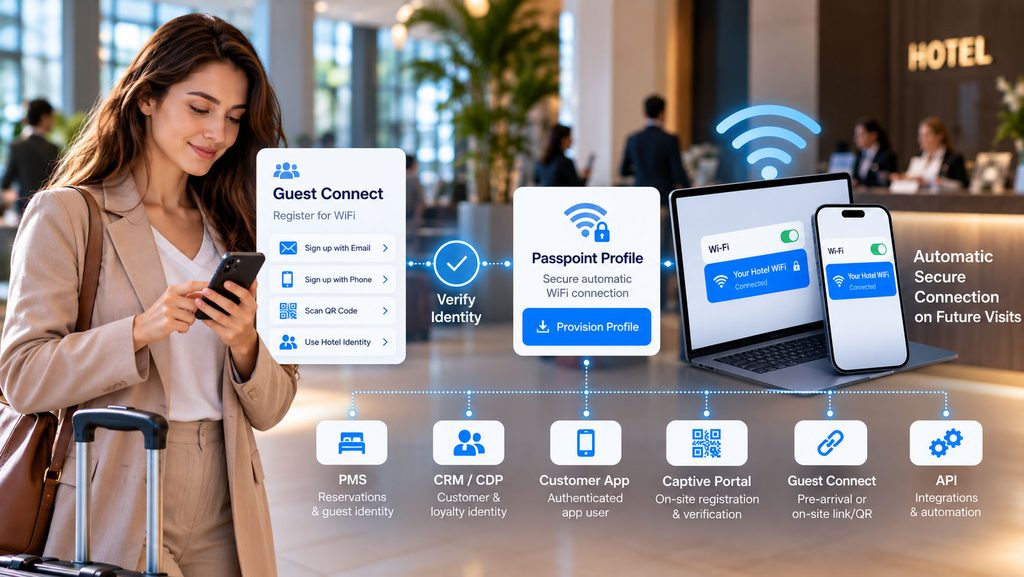
Passpoint WiFi can do much more than remove a repeated login screen.
When Passpoint / Hotspot 2.0 is connected with guest identity, verification, PMS, CRM, loyalty or an existing customer application, secure automatic WiFi can become part of the wider customer journey.
Wiacom can provision Passpoint profiles through different onboarding channels — including Captive Portal, Guest Connect, hotel and customer applications, PMS or reservation workflows, CRM and loyalty identity, and API-driven processes.
The objective is not simply to install a WiFi profile. It is to connect verified identity → network access → secure automatic reconnection.
From Guest WiFi Login to Automatic Secure Connectivity
Traditional Guest WiFi often starts again every time the user arrives:
Connect → Captive Portal → Register → Authenticate → Internet Access
Passpoint can extend that journey:
Identify → Verify → Provision Passpoint Profile → Secure Automatic WiFi on Future Visits
The initial identity journey remains valuable. Passpoint reduces the need to repeat it unnecessarily.
What Is Passpoint WiFi and Hotspot 2.0?
Passpoint WiFi uses Hotspot 2.0 capabilities to allow compatible devices to recognise and securely authenticate to participating WiFi networks after the appropriate profile has been provisioned.
Instead of asking a returning user to repeatedly find the network, open a login page and complete the same Guest WiFi registration process, a compatible device can use its provisioned profile for secure automatic connectivity.
This makes Passpoint relevant to hotels, hospitality groups, shopping centres, public venues, managed residential environments, enterprises, MSPs and other multi-location WiFi deployments.
Passpoint WiFi vs Captive Portal: They Can Work Together
Passpoint and a Captive Portal do not have to be competing approaches.
A Captive Portal can remain the first-stage Guest WiFi journey used to capture identity, present required terms, manage privacy information, collect optional consent and complete the required verification.
After that initial workflow, a compatible device can be offered a Passpoint profile for future connectivity.
Guest WiFi → Captive Portal → Registration → Verification → Passpoint Provisioning → Automatic Future Connection
This allows organisations to preserve the business and identity functions of their Captive Portal while reducing repeated login friction for known users.
Learn more about the Wiacom Captive Portal.
Verified Passpoint Onboarding by Email or Phone
A Passpoint profile does not need to be provisioned immediately after an anonymous page visit.
Wiacom can make profile provisioning dependent on the identity and verification workflow required by the customer.
- email registration and confirmation;
- phone registration with PIN or OTP verification;
- existing guest or customer identity;
- reservation or PMS identity;
- CRM or loyalty identity;
- authenticated customer-app session;
- another trusted API-driven workflow.
This allows organisations to determine who receives a Passpoint profile and under what conditions, rather than treating provisioning as an isolated network action.
Guest Connect: Passpoint Before Arrival or On-Site
Wiacom Guest Connect allows Guest WiFi onboarding to start through a web link or QR code independently of the WiFi connection event.
This means Passpoint onboarding can potentially begin before the user arrives at the physical location.
Invitation → Guest Connect → Identity → Verification → Passpoint Profile → Arrival → Automatic WiFi
Guest Connect can be distributed through booking communications, email, SMS, digital check-in, a customer application, reception workflow, QR code or another customer touchpoint.
For hotels, this allows WiFi to become part of the pre-arrival digital guest journey rather than something the guest discovers only after reaching the room.
Passpoint WiFi for Hotels and Hospitality
Hotel WiFi has an important advantage over many anonymous public WiFi environments: the hotel often already knows who the guest is.
The guest may already exist in a booking system, PMS, loyalty programme, CRM, customer application or digital check-in workflow.
Wiacom can connect that existing identity context with Guest WiFi access and Passpoint provisioning.
- pre-arrival Passpoint onboarding;
- profile provisioning after email or phone verification;
- guest identification from a reservation or PMS workflow;
- loyalty-linked WiFi onboarding;
- returning-guest recognition;
- secure automatic WiFi on compatible devices;
- access policies connected with the guest journey.
This allows Passpoint WiFi for hotels to become part of the hospitality identity architecture rather than an isolated wireless-network feature.
See how Wiacom approaches Hotel WiFi, guest identity and onboarding.
PMS, CRM and Loyalty-Driven Passpoint Provisioning
Passpoint provisioning can also be connected with business systems that already contain trusted customer identity.
Depending on the deployment, Wiacom can integrate WiFi onboarding with:
- hotel PMS and reservation systems;
- CRM platforms;
- CDP environments;
- loyalty programmes;
- booking journeys;
- customer applications;
- identity providers;
- external systems through APIs and webhooks.
A Passpoint profile can therefore be associated with a known guest, customer or user rather than existing only as an unrelated WiFi credential.
For hospitality, this can connect the network-access journey with the same identity already used for reservations, loyalty, communications and customer engagement.
Passpoint Through a Customer Mobile App
Organisations with an existing customer or loyalty application do not necessarily need to send users through a separate WiFi registration journey.
An authenticated application can become another onboarding channel for Passpoint provisioning where the application, operating system and deployment support the required workflow.
Authenticated App User → WiFi Enrollment → Passpoint Profile → Secure Automatic Connectivity
This can help connect digital identity, customer applications and physical WiFi access within the same wider customer experience.
One Passpoint Platform, Multiple Identity Sources
| Onboarding route | Identity / verification source | Passpoint outcome |
|---|---|---|
| Captive Portal | Email, phone, social or guest registration | Profile after the required verification workflow |
| Guest Connect | QR code, URL or pre-arrival registration | Profile before arrival or during onboarding |
| PMS / Reservation | Known hotel guest or booking | Passpoint linked with the guest journey |
| CRM / Loyalty | Known customer identity | Profile for recognised or returning users |
| Customer App | Authenticated application user | Passpoint provisioning through the digital journey |
| API | External trusted identity workflow | Automated profile provisioning according to policy |
Customer-Specific Passpoint Organization Identity
Passpoint deployments do not need to place every customer into the same generic identity environment.
Wiacom can create customer-specific Passpoint organisation environments so that a hotel group, enterprise, MSP, ISP or other organisation can operate within its own deployment context.
Depending on the architecture, customer environments can have their own:
- organisation identity and deployment details;
- Passpoint configuration;
- onboarding policies;
- authentication environment;
- RADIUS infrastructure;
- PMS, CRM or identity integrations;
- customer-specific workflows;
- separate operational environment.
This is particularly relevant to hotel groups, MSPs, ISPs and multi-tenant service environments where customer separation and independent authentication architecture are important.
Passpoint WiFi, RADIUS and Secure Authentication
Passpoint operates within a secure identity-based WiFi architecture rather than relying on a permanent shared Guest WiFi password.
Depending on the deployment, Wiacom can integrate Passpoint with RADIUS / AAA and compatible WPA2/WPA3 Enterprise infrastructure.
The authentication environment can be operated according to the customer’s technical requirements, including deployments using customer-specific RADIUS infrastructure.
This allows Passpoint to form part of a broader WiFi identity and authentication model rather than simply providing convenient reconnection.
Passpoint Across Mixed-Vendor WiFi Environments
Large organisations and managed service providers do not always operate one WiFi vendor everywhere.
A hotel group, enterprise or MSP portfolio may contain different wireless platforms across locations because of acquisitions, phased upgrades, regional standards or existing infrastructure.
Wiacom is designed to operate as an identity, onboarding and access layer above supported WiFi infrastructure rather than requiring every location to be replaced with one hardware vendor.
This makes Passpoint particularly relevant to multi-location and mixed-vendor WiFi deployments where the organisation wants a more consistent identity and onboarding model above the underlying networks.
Passpoint for Returning Guest WiFi
One of the strongest Passpoint use cases is the returning user.
Traditional Guest WiFi frequently treats every connection as another login event.
With Passpoint, compatible devices with an appropriate profile can securely recognise participating networks and reconnect without forcing the user to repeat the same Captive Portal journey.
This can be particularly useful for:
- returning hotel guests;
- loyalty members;
- repeat retail visitors;
- residents;
- staff and enterprise users;
- users moving between multiple participating locations.
When combined with identity and analytics, automatic reconnection can also provide stronger continuity between recognised users and future network activity.
Learn more about WiFi Analytics and returning-visitor intelligence.
Passpoint Is More Than Passwordless WiFi
The visible user benefit of Passpoint is simple: less WiFi friction.
The larger opportunity is connecting automatic WiFi with the organisation’s existing identity architecture.
Instead of:
Network → Generic Profile → Connection
the workflow can become:
Customer Identity → Verification → Business-System Context → Passpoint Profile → Secure Automatic WiFi
This is where Passpoint becomes part of Guest WiFi identity, hotel technology, CRM, loyalty, digital onboarding and managed network services.
Passpoint Implementation and Technical Support
Deploying Passpoint involves more than creating the profile itself.
Wiacom can work with customers, MSPs, ISPs and WiFi integrators across the wider deployment, including:
- Passpoint / Hotspot 2.0 deployment design;
- WiFi controller configuration;
- RADIUS / AAA integration;
- WPA2/WPA3 Enterprise integration;
- profile provisioning workflows;
- Captive Portal onboarding;
- Guest Connect onboarding;
- email and phone verification workflows;
- PMS and reservation integration;
- CRM/CDP and loyalty integration;
- customer application and API integration;
- multi-vendor WiFi environments;
- device testing;
- advanced troubleshooting;
- multi-location deployment;
- ongoing authorised technical changes.
Wiacom can therefore act as the software platform, implementation partner and technical operations layer around the Passpoint deployment.
Passpoint WiFi With Wiacom
Wiacom Passpoint Connect combines Passpoint / Hotspot 2.0 with WiFi identity, verified onboarding, RADIUS authentication and integrations with customer business systems.
Profiles can be provisioned through Captive Portal, Guest Connect, PMS, CRM, loyalty, customer applications and API-driven workflows according to the deployment.
Customer-specific organisation environments allow Wiacom to support Passpoint across hotel groups, enterprises, MSPs, ISPs and other multi-tenant or multi-location deployments while maintaining customer-specific identity and authentication context.
Passpoint WiFi FAQ
Can Passpoint WiFi work with a Captive Portal?
Yes. A Captive Portal can be used for the initial guest identity, consent or verification journey and then provision a Passpoint profile for compatible devices. Future visits can use secure automatic authentication instead of repeating the same portal journey.
Can Passpoint be provisioned after email verification?
Yes. Wiacom can make Passpoint provisioning part of an email-registration and confirmation workflow according to the customer configuration.
Can Passpoint be provisioned after phone or PIN verification?
Yes. Phone-based registration and PIN or OTP verification can be used as part of the identity workflow before Passpoint provisioning.
Can Passpoint integrate with a hotel PMS?
Yes. Depending on the PMS, deployment and available integration method, Wiacom can connect hotel identity and reservation workflows with Passpoint onboarding and Guest WiFi access.
Can Passpoint use CRM or loyalty identity?
Yes. Passpoint provisioning can form part of a wider customer-identity workflow involving CRM, loyalty, CDP or another trusted customer system where the required integration is available.
Can Passpoint be provisioned through a customer app?
Yes. A customer application can be used as an onboarding channel where the application, operating system and deployment support the required profile-provisioning workflow.
Is Passpoint only for hotels?
No. Passpoint is relevant to hospitality, retail, managed living, public venues, enterprise networks, MSPs, ISPs and other environments requiring secure automatic WiFi connectivity.
Does Wiacom support customer-specific Passpoint environments?
Yes. Wiacom can create customer-specific organisation and deployment environments, including separate identity, authentication, RADIUS and integration models according to the technical architecture.
Wiacom Passpoint WiFi / Hotspot 2.0 → Explore Wiacom features (tech side) →


