

Education & Campus WiFi: Student, Staff, Guest & IoT Onboarding
One WiFi Identity and Access Layer Across the Campus
Wiacom helps schools, colleges, universities and education groups manage how students, staff, guests and connected devices access campus WiFi.
Use Wiacom for student and staff onboarding, Guest WiFi, BYOD, IoT device registration, individual WiFi credentials, Captive Portal, RADIUS authentication, Passpoint WiFi and integration with existing campus systems.
Wiacom operates as a software and service layer above compatible existing infrastructure and can support multi-campus and mixed-vendor WiFi environments without requiring wholesale replacement of the network.
Students. Staff. Guests. Devices. One adaptable WiFi onboarding and access layer across existing campus infrastructure.
Campus WiFi Onboarding for Students, Staff, Guests and Devices
Education networks must support very different users and devices across the same campus infrastructure.
Wiacom can provide dedicated onboarding and access journeys for:
- students and their personal devices;
- faculty and staff;
- guests and campus visitors;
- contractors and temporary users;
- conference and event attendees;
- managed and unmanaged BYOD devices;
- printers, projectors and classroom equipment;
- smart displays, AV equipment and other IoT or browserless devices.
Each group can use the identity, authentication and WiFi access method appropriate to its role, device type and campus policy.
Student & Staff Connect
Wiacom can provide self-service or automated WiFi onboarding for students, faculty, employees, contractors and other authorised campus users.
Rather than creating another isolated WiFi identity, Wiacom can connect campus WiFi onboarding and access with the institution’s existing identity, directory and education systems.
Depending on the deployment, users can be authenticated or provisioned through:
- Microsoft 365 / Entra ID;
- Google Workspace;
- Active Directory / LDAP;
- institutional SSO;
- OAuth 2.0 / OpenID Connect providers;
- Student Information Systems (SIS);
- School Management or MIS platforms;
- university or school mobile applications;
- student and staff portals;
- custom identity platforms and APIs.
Self-Service Onboarding
Students and staff can access Student Connect or Staff Connect through a web link, QR code, campus portal or institution application and authenticate using their existing institutional identity.
A typical journey can become:
Student / Staff → Student or Staff Connect → Institutional Authentication → Policy → WiFi Access
Automatic WiFi Provisioning
WiFi onboarding does not necessarily need to begin with a student or staff member manually registering.
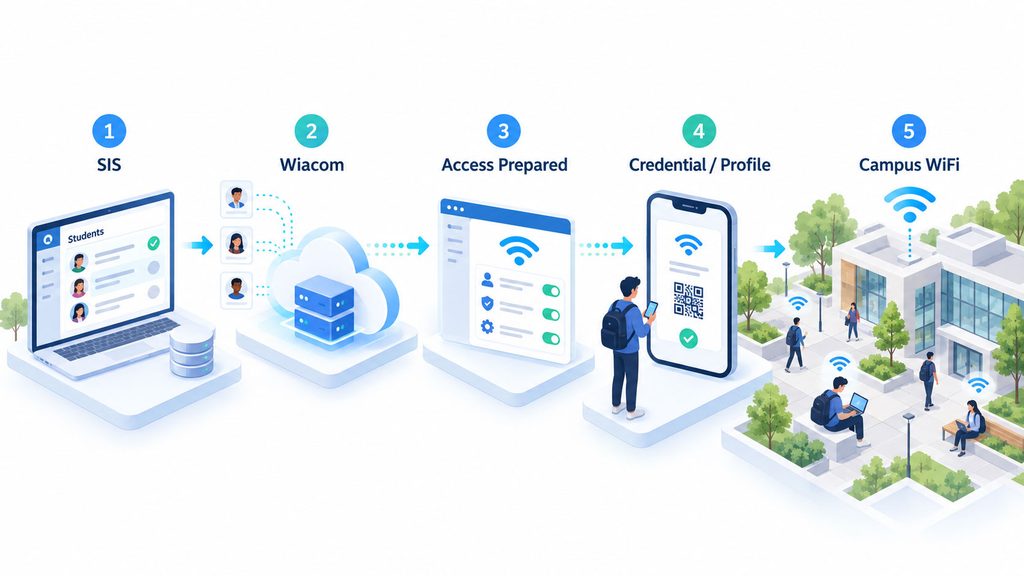
Where integration with a Student Information System (SIS), School Management / MIS platform, institutional directory or another authorised system is available, Wiacom can receive user and lifecycle information and automatically prepare the appropriate WiFi access.
Student enrolled in SIS → Student provisioned to Wiacom → WiFi access prepared → Credential or profile issued → Campus WiFi
Network access can therefore follow the institutional lifecycle, including enrolment, employment, campus assignment, accommodation, status changes and departure.
Identity and Policy-Based Access
Identity information from connected systems can be used to determine the appropriate network-access policy.
Policies can use available attributes such as:
- student or staff status;
- faculty or department;
- campus or building;
- accommodation;
- user role;
- contractor status;
- enrolment or employment lifecycle;
- access duration;
- device type;
- other authorised directory or SIS attributes.
This gives institutions a choice between self-service onboarding, institutional SSO, app-based onboarding and automatic provisioning from existing education systems, while Wiacom manages the corresponding WiFi access workflow.
School App, Student Portal and WiFi API Integration
WiFi onboarding can also become part of the institution’s existing digital experience.
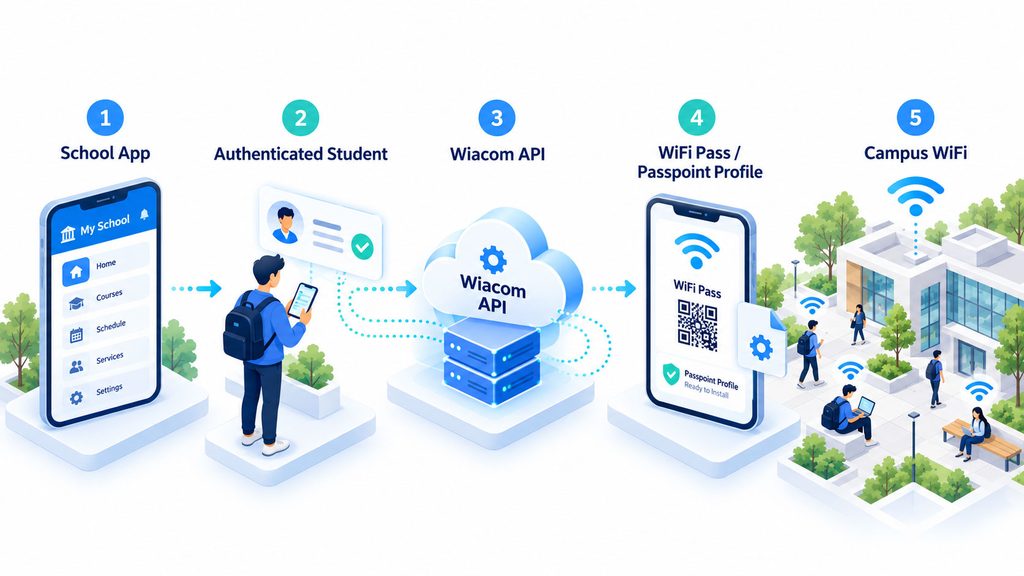
A university or school application can provide a Connect to WiFi function that calls Wiacom through an API and provisions the appropriate access method.
For example:
School App → Authenticated Student → Wiacom API → WiFi Pass / Passpoint Profile → Campus WiFi
The same model can be used from student portals, digital-campus applications and other institution-controlled platforms.
Guest Connect and Captive Portal
Visitors do not need to follow the same authentication journey as students or permanent staff.
Wiacom can provide a dedicated Guest Connect or Captive Portal workflow for parents, guest lecturers, contractors, event attendees and other temporary users.
Guest onboarding can include:
- email registration and verification;
- phone and OTP verification;
- QR or web-link onboarding;
- terms and privacy notices;
- time-limited access;
- pre-registration or sponsored access;
- event and conference workflows;
- returning-user recognition where configured.
Guest Connect can also operate independently from the initial WiFi connection, allowing users to register through a URL or QR code before joining the network.
Device and IoT Onboarding
Not every campus device has a browser, keyboard or user capable of completing a normal interactive WiFi login.
Wiacom can support controlled onboarding for devices such as:
- printers;
- projectors;
- interactive displays;
- classroom AV equipment;
- smart TVs;
- digital signage;
- specialist teaching equipment;
- other supported IoT and browserless devices.
Depending on the network infrastructure, devices can be associated with an owner, department, building, location or lifecycle and assigned the appropriate credential or access policy.
This allows user onboarding and device onboarding to remain separate while both are managed within the same campus access environment.
One Campus. Multiple WiFi Access Methods.
Wiacom can provide different WiFi access methods according to user, device, policy and existing campus infrastructure.
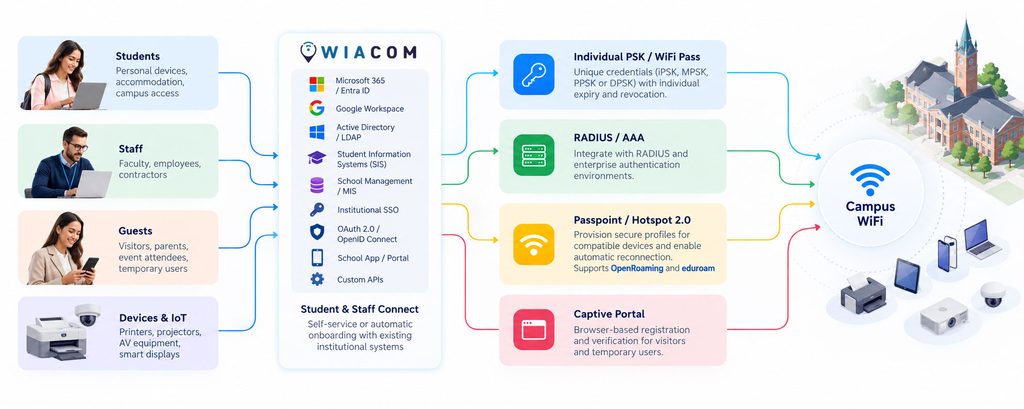
Individual PSK / WiFi Pass
Issue unique WiFi credentials to students, staff or devices using supported iPSK, MPSK, PPSK or DPSK technologies, with individual expiry and revocation.
RADIUS / AAA
Integrate identity-based access with compatible RADIUS and enterprise authentication environments, using available identity attributes to apply the appropriate access policy.
Passpoint / Hotspot 2.0
Use Passpoint WiFi / Hotspot 2.0 to provision secure profiles for compatible devices and enable automatic reconnection across participating networks.
Wiacom can also support OpenRoaming and eduroam environments, allowing Passpoint, institutional authentication, roaming and other WiFi access methods to coexist as part of the broader campus connectivity strategy.
Captive Portal
Provide browser-based registration, verification and network authorisation for visitors, temporary users and other Guest WiFi use cases.
Work With Existing Campus WiFi
Wiacom does not require institutions to replace existing authentication or roaming services.
It can complement current campus WiFi by adding Student & Staff Connect, Guest WiFi, individual credentials, device onboarding, Passpoint, RADIUS integration, analytics and external-system integrations across compatible infrastructure.
From Campus WiFi Data to Smart-Building Operations
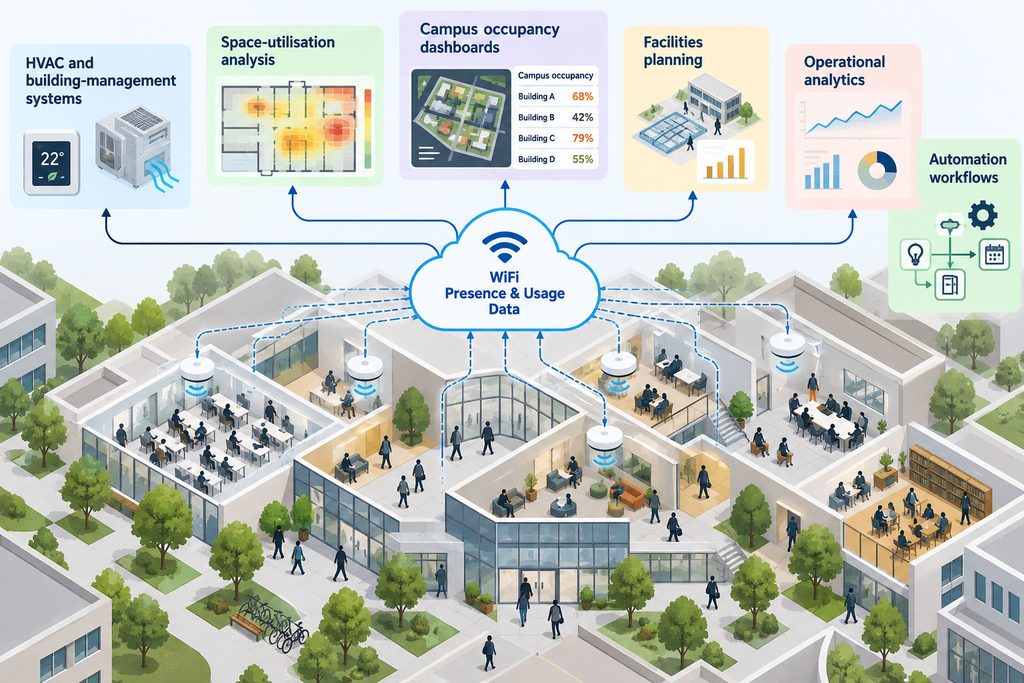
Where the required network data is available, Wiacom can make WiFi-derived presence, location or usage information available to other operational systems.
For example, aggregated occupancy or presence indicators can become an additional input for:
- HVAC and building-management systems;
- space-utilisation analysis;
- campus occupancy dashboards;
- facilities planning;
- operational analytics;
- automation workflows.
This can help transform WiFi infrastructure from a connectivity service into another source of operational intelligence for the campus.
Data availability, accuracy, privacy requirements and the capabilities of the underlying infrastructure determine which use cases can be implemented.
Connect WiFi Data With Campus AI and Automation
Education organisations are increasingly connecting operational systems with analytics, automation and AI platforms.
Where an institution already operates an approved AI or data platform, Wiacom can provide controlled integration points for relevant WiFi and network-access information through supported APIs and custom integrations.
Depending on the deployment, this could include information related to:
- network access and authentication events;
- campus or building activity;
- presence and occupancy indicators;
- device and access status;
- operational network information;
- analytics and historical trends.
Campus WiFi → Identity & Access Data → Operational Systems → Analytics, Automation & AI
Integrations can be designed around the institution’s security, privacy and data-governance requirements.
Campus WiFi Across Mixed-Vendor Infrastructure
Schools, colleges and universities can operate different WiFi platforms across campuses, buildings, student accommodation, acquired sites and different infrastructure generations.
Wiacom is vendor-agnostic and provides a common identity, onboarding, access and integration layer across compatible WiFi infrastructure.
This can help education organisations standardise student, staff, guest and device onboarding without requiring every campus or building to use the same WiFi vendor.
Supported environments can include:
- Cisco Meraki;
- Cisco WLC;
- HPE Aruba;
- Ruckus;
- UniFi;
- Cambium;
- Fortinet;
- MikroTik;
- TP-Link Omada;
- other compatible WiFi infrastructure.
This allows an education organisation to standardise the user experience and access layer without making a single-vendor campus network a prerequisite.
Integrate Campus WiFi With NMS and Other Education Systems
WiFi access does not need to operate as an isolated infrastructure service.
Through APIs, webhooks and custom integrations, Wiacom can exchange relevant information with compatible campus systems including:
- Network Management Systems (NMS);
- identity and authentication platforms;
- student or staff applications;
- service-management and operational systems;
- analytics and BI platforms;
- building-management systems;
- institutional applications and APIs;
- approved AI and automation platforms.
The objective is to make WiFi identity, access and operational information usable beyond the WLAN management console where appropriate.
Cisco Meraki Integration & Cisco Ecosystem
Cisco Developer Worldwide partner • Direct Cisco Meraki API integration • Two applications listed on the Cisco Networking App Marketplace
Wiacom integrates directly with compatible Cisco Meraki networks through the Meraki Dashboard API, allowing Wiacom onboarding, identity and network-access workflows to interact with existing Meraki infrastructure.
Wiacom is also a Cisco Developer Worldwide partner and has two applications listed on the Cisco Networking App Marketplace:
- Wiacom Guest WiFi — branded Captive Portal, guest identity, consent, engagement and WiFi analytics.
- Wiacom | Guest Connect — URL- and QR-based WiFi onboarding that can operate independently from the captive-portal connection journey.
For schools, universities and education groups using Cisco Meraki, Wiacom can extend the existing infrastructure with guest access, student and staff onboarding, identity-based access, WiFi provisioning and additional integration workflows.
Wiacom remains vendor-agnostic, allowing Cisco Meraki campuses to be managed alongside locations using other compatible WiFi infrastructure.
Education WiFi Implementation and Technical Support
Wiacom is not limited to supplying campus WiFi software.
We can work with internal IT teams, MSPs, network integrators and education groups to design, implement and operate the required access workflows.
- Captive Portal implementation;
- Student Connect and Staff Connect workflows;
- Guest WiFi configuration;
- WiFi controller and SSID configuration;
- RADIUS / AAA integration;
- WPA2/WPA3 Enterprise workflows;
- iPSK / MPSK / PPSK deployment;
- Passpoint / Hotspot 2.0;
- IoT and device onboarding;
- API and NMS integration;
- multi-campus rollout;
- mixed-vendor troubleshooting;
- advanced WiFi troubleshooting;
- ongoing authorised configuration changes.
Wiacom can therefore operate as the software platform, implementation partner and technical operations layer around the education WiFi environment.
Education & Campus WiFi FAQ
What is a campus WiFi onboarding platform?
A campus WiFi onboarding platform manages how students, staff, guests and devices are identified, registered and provided with the appropriate network access. Wiacom can combine self-service onboarding, Captive Portal, individual credentials, RADIUS and Passpoint according to the campus infrastructure.
Can Wiacom provide separate WiFi onboarding for students and staff?
Yes. Wiacom onboarding can be adapted into separate Student Connect and Staff Connect journeys with different registration, identity and access policies.
Can every student receive a unique WiFi password?
Yes, where supported by the WiFi infrastructure. Wiacom WiFi Pass can provide individual credentials using technologies such as iPSK, MPSK, PPSK or DPSK rather than relying on a common shared password.
Can Wiacom onboard printers, projectors and IoT devices?
Yes. Wiacom can support onboarding workflows for compatible browserless and IoT devices such as printers, projectors, displays, classroom AV equipment and other campus devices. The exact authentication method depends on the infrastructure and device capabilities.
Does Wiacom support BYOD WiFi?
Yes. Wiacom can provide self-service onboarding and identity-based access for student and staff BYOD devices using the access methods supported by the campus network.
Can Wiacom work with RADIUS and WPA2/WPA3 Enterprise?
Yes. Wiacom can integrate with compatible RADIUS / AAA and WPA2/WPA3 Enterprise environments as part of an identity-based campus WiFi deployment.
Can universities use Passpoint WiFi?
Yes. Passpoint / Hotspot 2.0 can provide secure profile-based WiFi onboarding and automatic reconnection for compatible devices and networks. Wiacom Passpoint Connect can be combined with student, staff or other identity workflows.
Does Wiacom replace eduroam?
Not necessarily. Wiacom can complement existing campus WiFi and authentication services by providing additional onboarding, guest access, individual credentials, device onboarding, analytics and integration workflows where required.
Does Wiacom support eduroam and OpenRoaming?
Yes. Wiacom can complement existing eduroam and OpenRoaming environments while providing additional onboarding, Guest WiFi, Passpoint, individual credentials, device onboarding, analytics and integration workflows.
Institutions do not need to replace their existing roaming or authentication services to introduce Wiacom.
Can Wiacom work across different WiFi vendors?
Yes. Wiacom is vendor-agnostic and can support mixed-vendor and multi-campus environments using compatible infrastructure from Cisco Meraki, Cisco WLC, HPE Aruba, Ruckus, UniFi, Cambium, Fortinet, MikroTik, TP-Link and other vendors.
Can WiFi data be integrated with an HVAC or building-management system?
Potentially. Where the required WiFi presence or occupancy data is available, Wiacom can expose relevant information to compatible building-management, analytics or HVAC systems through supported integrations. The exact capability depends on the network data, integration and privacy requirements.
Can Wiacom integrate with a university AI platform?
Yes, where an appropriate API or integration method is available. Relevant WiFi, authentication, presence or operational data can be made available to institution-controlled analytics, automation or AI systems according to the organisation’s security, privacy and data-governance requirements.
Build Campus WiFi Around People, Devices and Existing Infrastructure
Campus WiFi is no longer only about providing an SSID and internet connection.
Students need simple BYOD onboarding. Staff need controlled access. Visitors need Guest WiFi. Printers, projectors and IoT equipment need their own device workflows. IT teams need visibility across campuses and WiFi vendors.
Wiacom brings these requirements together through a common identity, onboarding, access, analytics and integration layer while allowing the institution to continue using compatible WiFi infrastructure already in place.
Student WiFi. Staff WiFi. Guest WiFi. IoT onboarding. One adaptable campus access platform.
WiFi Identity, Access, Engagement and Analytics for Marketing, IT & Operations Teams

US, UK, EU: +40 721 260 892
info@wiacom.ai
© 2026 Wiacom
All rights reserved


